Wi-Fi 7 vs Wi-Fi 6 and 6E: what actually changed, and whether to wait for Wi-Fi 8
Wi-Fi 7's headline 46 Gbps is unreachable and beside the point. Multi-Link Operation is the real upgrade, 320 MHz channels are regionally constrained, and Wi-Fi 8 certification is a 2028 matter.
Wi-Fi 7 is sold on a number: 46 Gbps. You will not see it, your devices cannot reach it, and it is not why the standard is worth having. The genuinely useful change in Wi-Fi 7 is not speed at all — it is a feature called Multi-Link Operation, which makes a connection steadier rather than faster.
This article separates what changed from what matters, covers why the headline speed is unreachable in most of the world for regulatory reasons, and answers the question that sits behind most of the searching: whether to wait for Wi-Fi 8.
The three generations, briefly
Confusion here is understandable, because one of the three is not a new standard at all.
- Wi-Fi 6 (802.11ax) — 2.4 GHz and 5 GHz. Introduced OFDMA and improved behaviour with many devices at once. It was about efficiency in crowded environments rather than peak speed.
- Wi-Fi 6E — the same 802.11ax standard, extended into the newly opened 6 GHz band. No new protocol features. The point was clean spectrum: a band with no legacy devices on it.
- Wi-Fi 7 (802.11be) — a genuine new standard, operating across all three bands, adding wider channels, denser modulation, and Multi-Link Operation.
So the comparison people usually want — Wi-Fi 7 against Wi-Fi 6E — is a comparison between a new protocol and a band extension.
What Wi-Fi 7 actually adds
320 MHz channels
Double the 160 MHz maximum of Wi-Fi 6E, and double the width means roughly double the throughput at the same signal quality. This is where most of the headline number comes from, and it carries the largest regional asterisk — see below.
4096-QAM
Each radio symbol carries 12 bits instead of the 10 bits of 1024-QAM, a theoretical gain of about 20%. Denser modulation needs a cleaner signal, so this benefit appears close to the access point and disappears across the house. If you are far enough away to care about coverage, you are too far away to use it.
Multi-Link Operation
This is the one worth paying for. Before Wi-Fi 7, a client associated with one band at a time — 5 GHz or 6 GHz — and switching between them meant a brief disconnection. MLO lets a client use several bands simultaneously, as one logical link.
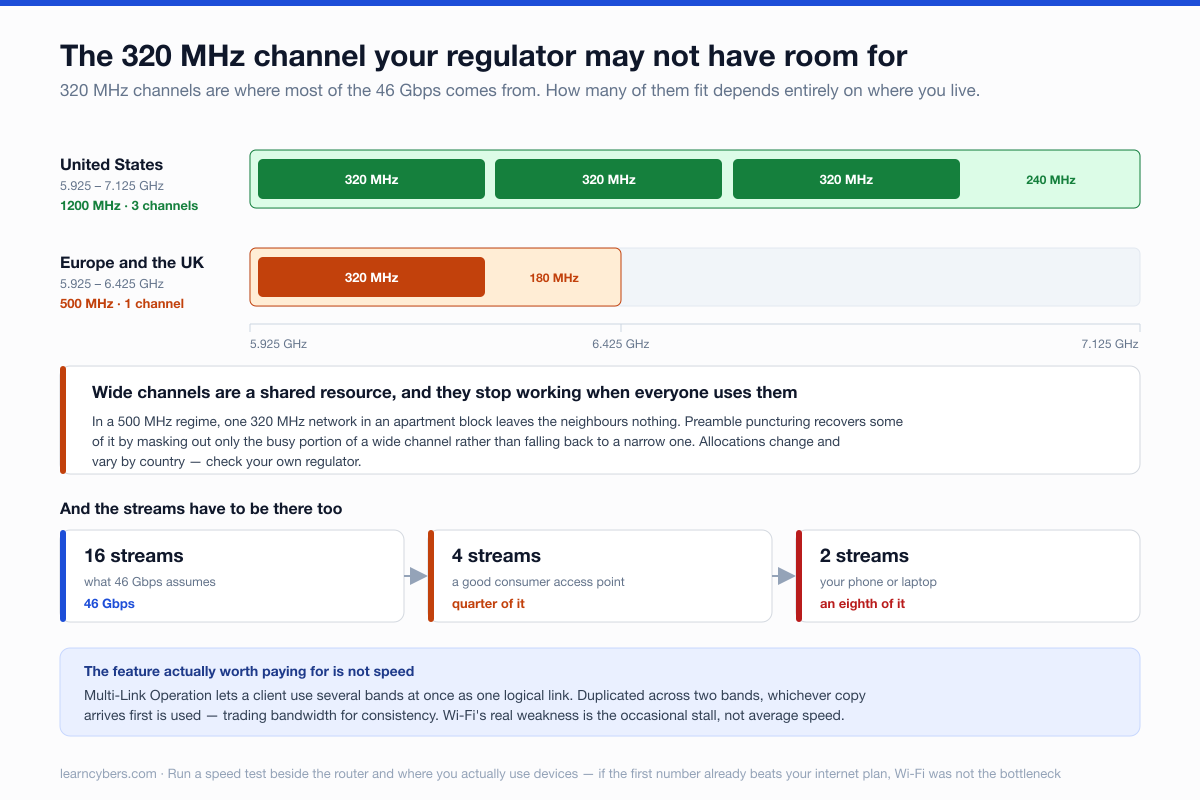
It can be used two ways, and they serve different purposes. Aggregated, the links add throughput. Duplicated, the same data goes over two bands at once and whichever arrives first is used — which trades bandwidth for consistency.
The second mode is what makes MLO matter. Wi-Fi's weakness in practice is rarely average speed; it is the occasional stall when a channel is momentarily busy or you walk behind a wall. Sending across two bands makes those stalls far less visible. For video calls, game streaming, VR, or a smart home full of chatty devices, steadier beats faster.
Preamble puncturing
Previously, if any part of a wide channel was occupied by another network, the whole channel width was unusable and the radio fell back to something narrower. Puncturing lets the radio mask out just the busy portion and keep using the rest. In an apartment building with a dozen overlapping networks, this recovers real capacity.
The regional limit nobody mentions
The 320 MHz channels that produce Wi-Fi 7's headline figures need a large block of 6 GHz spectrum, and how much of that band is available depends on where you live.
The United States allocated the full 5.925–7.125 GHz range — 1,200 MHz, enough for three non-overlapping 320 MHz channels. Much of Europe, including the UK, allocated only the lower portion, 5.925–6.425 GHz. That is 500 MHz, which fits one 320 MHz channel, and only if nothing else is using it.
The practical consequence: in a 500 MHz regulatory regime, a single 320 MHz network in an apartment block leaves neighbours nothing. Wide channels are a shared resource, and they stop working precisely when everyone uses them. Allocations continue to change and vary by country, so check your own regulator rather than assuming the American figures apply.
Why you will not see 46 Gbps
That number assumes 16 spatial streams, 320 MHz channels, 4096-QAM, and a perfect signal. Consumer access points ship with four streams at most, and phones and laptops typically have two. Halve the streams and you halve the rate; do it again for the client.
Then there is what the Wi-Fi connects to. A 2 Gbps home internet connection cannot be exceeded by improving Wi-Fi, and most connections are far slower than that. Faster Wi-Fi improves transfers between devices on your own network — moving files to a NAS, streaming to a headset — and does nothing at all for your connection to the internet if that connection was already the constraint.
Before upgrading anything, run a speed test standing next to the router and again where you actually use devices. If the first number already exceeds your internet plan, Wi-Fi was not your bottleneck.
6 GHz and walls
The clean spectrum that makes 6 GHz attractive comes with physics. Higher frequencies attenuate faster through solid material. A 6 GHz signal that is excellent in the same room can be poor two rooms away, where 5 GHz would still be serviceable and 2.4 GHz would be fine.
In a small flat, 6 GHz is close to ideal. In a house with masonry walls or across floors, a single access point on 6 GHz will disappoint, and the money is better spent on a second access point — ideally wired back — than on a faster single unit. This is the most common way a Wi-Fi 7 upgrade underwhelms: the standard is not the problem, the building is.
Should you wait for Wi-Fi 8?
No, and the timeline is the reason.
Wi-Fi 8 is IEEE 802.11bn, developed under the name Ultra High Reliability. Final IEEE approval is expected in May 2028, with the Wi-Fi Alliance's certification programme expected around the turn of 2027–2028 and its test plan finalised around mid-2027. Pre-standard hardware appeared at CES 2026 and the first consumer routers are expected during 2026, but certified, interoperable product in volume is a 2028 matter.
The direction of travel is also worth knowing, because it is unusual: Wi-Fi 8 is not chasing a bigger headline speed. Its stated goals are reliability improvements — roughly 25% better performance in poor signal conditions, 25% lower latency, and 25% fewer dropouts when roaming between access points.
Which means Wi-Fi 8 extends the thing Wi-Fi 7 started with MLO rather than replacing it. Buying Wi-Fi 7 now is not buying a dead end; it is buying the first generation of the reliability work that Wi-Fi 8 continues. And waiting two years to avoid a marginal upgrade is two years of not having the current one.
When it is worth it, and when it is not
Worth it now:
- You have devices with Wi-Fi 7 radios. Client support determines what you get; a Wi-Fi 7 router serving only Wi-Fi 6 clients gives you the router's improved scheduling and nothing else.
- Latency consistency matters — VR, competitive gaming, frequent video calls. This is the MLO case and the strongest reason to upgrade.
- You move large files across your own network, to a NAS or between machines.
- You live somewhere dense and congested, where preamble puncturing and 6 GHz genuinely help.
Not worth it yet:
- Your internet connection is slower than your current Wi-Fi already delivers. Fix the connection, or nothing else changes.
- Your problem is coverage. A faster access point does not reach further; 6 GHz reaches less far. Add a second unit.
- Your devices are Wi-Fi 6 or older and you are not replacing them soon.
- You are on Wi-Fi 6E in a small space with no congestion. The step from 6E to 7 is the smallest of the three.
If you are buying
Check the number of spatial streams rather than the headline rate — it tells you more. Confirm the unit supports MLO, since that is the feature worth having and early "Wi-Fi 7" models did not all implement it meaningfully. Check what your regulator permits in 6 GHz, because it determines whether 320 MHz channels are usable where you are. And if the house is large or awkward, budget for two access points with a wired link between them instead of one expensive one.
Sources and what is not measured here
The protocol features, channel widths and modulation figures are from the 802.11be specification as published. The Wi-Fi 8 timeline, certification schedule and reliability targets are from current Wi-Fi Alliance and IEEE task-group reporting as of September 2026 — a draft standard, so dates can move. Spectrum allocations are as currently assigned in the United States and much of Europe and change by jurisdiction.
We have not tested specific routers, and no throughput figures here are our own measurements. Any review quoting real-world Wi-Fi 7 speeds without stating the client device, its stream count, the channel width and the distance is describing one setup rather than the standard.