Build a Developer Toolkit Where the Data Never Leaves the Tab
How to create privacy-first browser utilities using vanilla JavaScript and Web APIs
Most small web tools upload whatever you paste to a server you know nothing about, and most of that paste is a production token. The browser can do all of it locally now — and a CSP lets you prove it rather than claim it.
Every developer uses a handful of small web tools — hash something, decode a JWT, format some JSON, convert a timestamp. Most of them upload whatever you paste to a server you know nothing about, and most of that paste is a production token, a customer record or a chunk of a config file.
The alternative is a toolkit where the data never leaves the tab, and modern browsers make it a surprisingly small amount of code. This walks through building one, and through the two places it is easy to build something that looks secure and is not.
What the browser already gives you
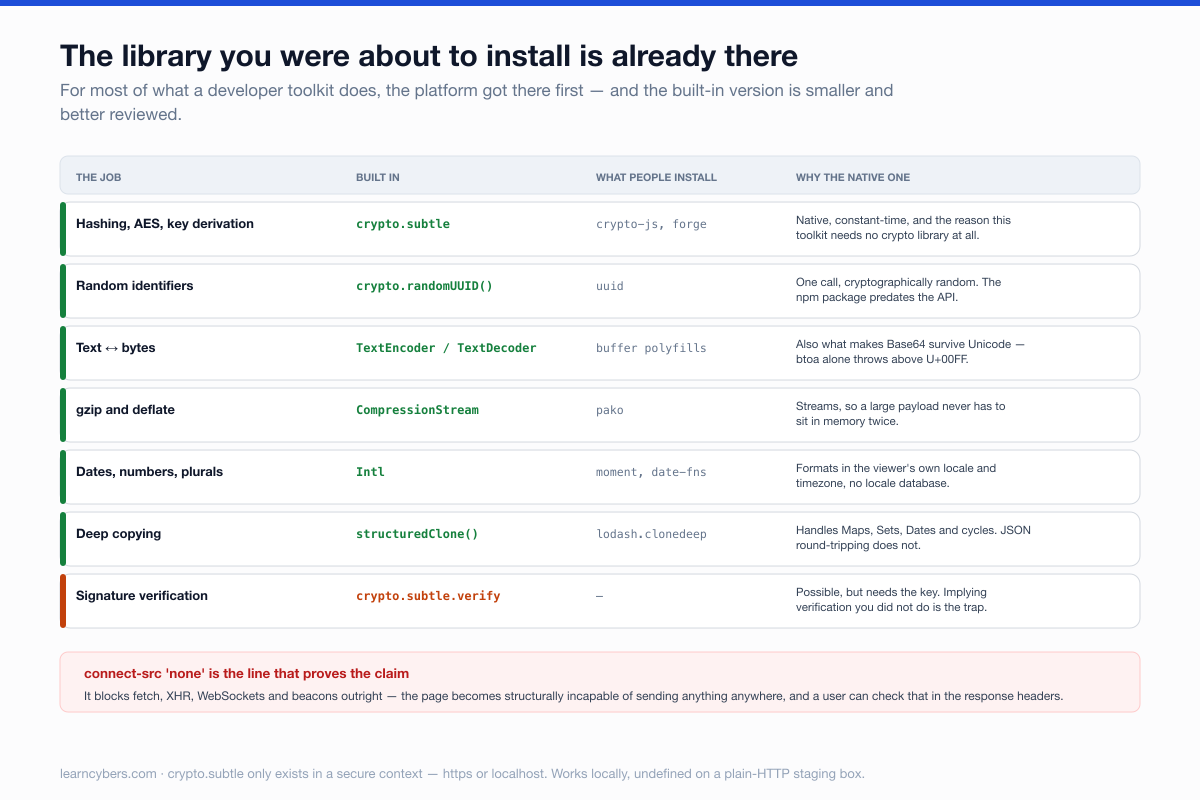
The instinct is to reach for a library. For most of what a toolkit does, the platform got there first and the built-in version is faster, smaller and better reviewed.
The important one is Web Crypto. It is a native implementation of hashing, symmetric encryption, key derivation and random generation — and it is why a toolkit like this does not need a crypto library at all.
// SHA-256 of a file, streamed, without loading a library
async function sha256(file) {
  const buf = await file.arrayBuffer()
  const digest = await crypto.subtle.digest('SHA-256', buf)
  return [...new Uint8Array(digest)]
    .map(b => b.toString(16).padStart(2, '0'))
    .join('')
}
One constraint to know before you build: crypto.subtle is only available in a secure context. It exists on https:// and on localhost, and it is undefined on a page served over plain HTTP. If your tool works locally and breaks on a staging box, this is almost always why.
Six tools that are each about twenty lines
Nothing here needs a build step. A single HTML file with a <script type="module"> is a perfectly good starting point, and you can add Vite later if it grows.
// Identifiers — no library, cryptographically random
const uuid = () => crypto.randomUUID()

// Base64 that survives Unicode (btoa alone does not)
const b64encode = s =>
  btoa(String.fromCharCode(...new TextEncoder().encode(s)))

const b64decode = s =>
  new TextDecoder().decode(Uint8Array.from(atob(s), c => c.charCodeAt(0)))

// Timestamps, formatted in the viewer's own locale and zone
const fromEpoch = n =>
  new Intl.DateTimeFormat(undefined, { dateStyle: 'full', timeStyle: 'long' })
    .format(new Date(n * 1000))

// Compress a string, natively
async function gzip(str) {
  const stream = new Blob([str]).stream()
    .pipeThrough(new CompressionStream('gzip'))
  return new Uint8Array(await new Response(stream).arrayBuffer())
}
The Base64 pair is worth taking as written. btoa throws on any character above U+00FF, so the naive version fails the first time somebody pastes an emoji or a name with an accent — and that bug reaches production constantly because the happy path tests pass.
The JWT decoder, and the mistake it invites
A JWT decoder is the tool people build first and the one most likely to mislead. Decoding a token is trivial: it is three base64url segments joined by dots. Verifying it requires the signing key, which you do not have.
function decodeJwt(token) {
  const [h, p, sig] = token.split('.')
  const json = s => JSON.parse(b64decode(s.replace(/-/g, '+').replace(/_/g, '/')))
  return {
    header: json(h),
    payload: json(p),
    signature: sig,          // present, and NOT checked
    verified: false,         // say so, every time
  }
}
Show the decoded contents and state plainly, in the interface and not in a tooltip, that the signature has not been verified. A decoder that renders a green tick next to "valid JSON" will be read as "valid token", and someone will eventually trust a forged one because your tool looked like it checked.
If you want real verification, it is possible — crypto.subtle.verify with an imported public key — but then the tool needs the key, and the honest version asks the user to paste one rather than implying it already knows.
Where a client-side tool stops being private
Two things undo the whole premise, and both are easy to do by accident.
Third-party scripts. Any analytics tag, font loader, error reporter or CDN-hosted library runs with full access to your page — including the token someone just pasted. A tool that promises the data stays local, while loading a script from someone else's domain, is making a promise it cannot keep. Self-host everything, and mean it.
A Content Security Policy is how you prove it rather than assert it:
Content-Security-Policy: default-src 'self'; script-src 'self';
  style-src 'self'; img-src 'self' data:; connect-src 'none';
  object-src 'none'; base-uri 'self'; frame-ancestors 'none'
connect-src 'none' is the line that matters most. It blocks fetch, XHR, WebSockets and beacons outright, so the page is structurally incapable of sending anything anywhere. That is a claim a user can verify from the response headers, which is worth more than a sentence on your about page.
It also means no inline handlers and no inline scripts, so build accordingly from the start — retrofitting a CSP onto a page full of onclick attributes is miserable.
Persistence you did not think about. Do not put pasted content in localStorage, do not put it in the URL — where it lands in history and in any referrer — and be careful with form autofill. Remember a chosen tab or a preferred indent width; do not remember the token someone pasted at half past four.
Why this architecture, rather than a small backend
A server-side version of the same tools is easier to write and worse in every way that matters here.
It has to be trusted. Every reassurance on the page — we do not log, we do not store, we delete immediately — is a claim the user cannot check, and history is full of tools where that claim was sincere and the access log was still on by default.
It has an attack surface. A backend that accepts arbitrary pasted input and parses it is a parser exposed to the internet, and parsers are where bugs live. A client-side tool has no endpoint to attack, nothing to rate-limit, and no incident to have.
And it costs. Not much, but it costs continuously — a process to keep running, a dependency tree to patch, a certificate to renew. Static files cost nothing and keep working when you stop paying attention to them, which is the realistic lifecycle of a side project.
The one thing a backend genuinely buys you is work that cannot happen in a browser: something needing a secret you cannot ship, or compute too heavy for a tab. If a tool needs neither, it does not need a server.
Offline, which is nearly free
A tool made only of static files works offline with a minimal service worker, and offline is a genuine feature here: it is the most convincing possible demonstration that nothing is being uploaded.
// sw.js — cache the shell on install, serve from cache first
const CACHE = 'toolkit-v1'
const SHELL = ['/', '/index.html', '/app.js', '/style.css']

self.addEventListener('install', e =>
  e.waitUntil(caches.open(CACHE).then(c => c.addAll(SHELL))))

self.addEventListener('fetch', e =>
  e.respondWith(caches.match(e.request).then(r => r ?? fetch(e.request))))
Version the cache name and clear old ones on activate, or a stale shell will outlive several deployments and you will get bug reports about behaviour you fixed weeks ago.
Hosting it
Static files, so anything that serves them will do — a bucket behind a CDN, a static host, a folder on a server. No backend means nothing to patch, no database to leak and no logs containing what people pasted.
That last point is the strongest thing about this architecture and it is worth saying out loud on the page. A server-side tool has to be trusted not to log. A client-side tool with connect-src 'none' cannot log, and anyone can confirm it in devtools in about fifteen seconds.
Scope
Web Crypto, CompressionStream, crypto.randomUUID and the File System Access API have differing support across browsers and versions — check current support tables before relying on any of them, and feature-detect rather than assuming.
Nothing here is a substitute for understanding the cryptography you are using. Building a hashing tool on crypto.subtle is fine; designing your own encryption scheme on top of it is not, and the fact that the primitives are easy to call does not make the design decisions easy to get right.