Git hooks for secrets: catching them locally, and enforcing it where it counts
Automated pre-commit checks that stop API keys, passwords, and tokens before they reach your repository
A local hook is bypassed by --no-verify, lives outside the clone, and never sees a web commit. Set it up anyway, then put the real enforcement in CI and push protection — and rotate before you rewrite history.

A secret committed to Git is not deleted by deleting it. It stays in history, reachable by anyone who can clone the repository, and it survives being removed in a later commit. On a public repository it is scraped within minutes — automated collectors watch the GitHub events firehose specifically for this.
Commit-time scanning is the cheapest prevention available. It is also, on its own, insufficient in a way most guides skip: a local hook is a convenience for the author, not a control. This covers both halves — catching it locally, and enforcing it where it cannot be bypassed.
Local hooks with pre-commit
The pre-commit framework manages hooks across languages and keeps the configuration in the repository so the whole team gets the same checks.
pip install pre-commitCreate .pre-commit-config.yaml at the repository root:
repos:
  - repo: https://github.com/gitleaks/gitleaks
    rev: v8.21.2
    hooks:
      - id: gitleaks

  - repo: https://github.com/pre-commit/pre-commit-hooks
    rev: v5.0.0
    hooks:
      - id: detect-private-key
      - id: check-added-large-files
args: ['--maxkb=500']pre-commit install # activate for this clone
pre-commit run --all-files # scan what is already thereRun that second command before you trust the first. Installing the hook protects future commits and tells you nothing about the ninety that came before, and the existing history is where the problem usually already is.
Pin rev to a tag rather than a branch. These hooks execute code on your machine on every commit; a floating reference means you run whatever was pushed this morning.
Why local hooks are not a control
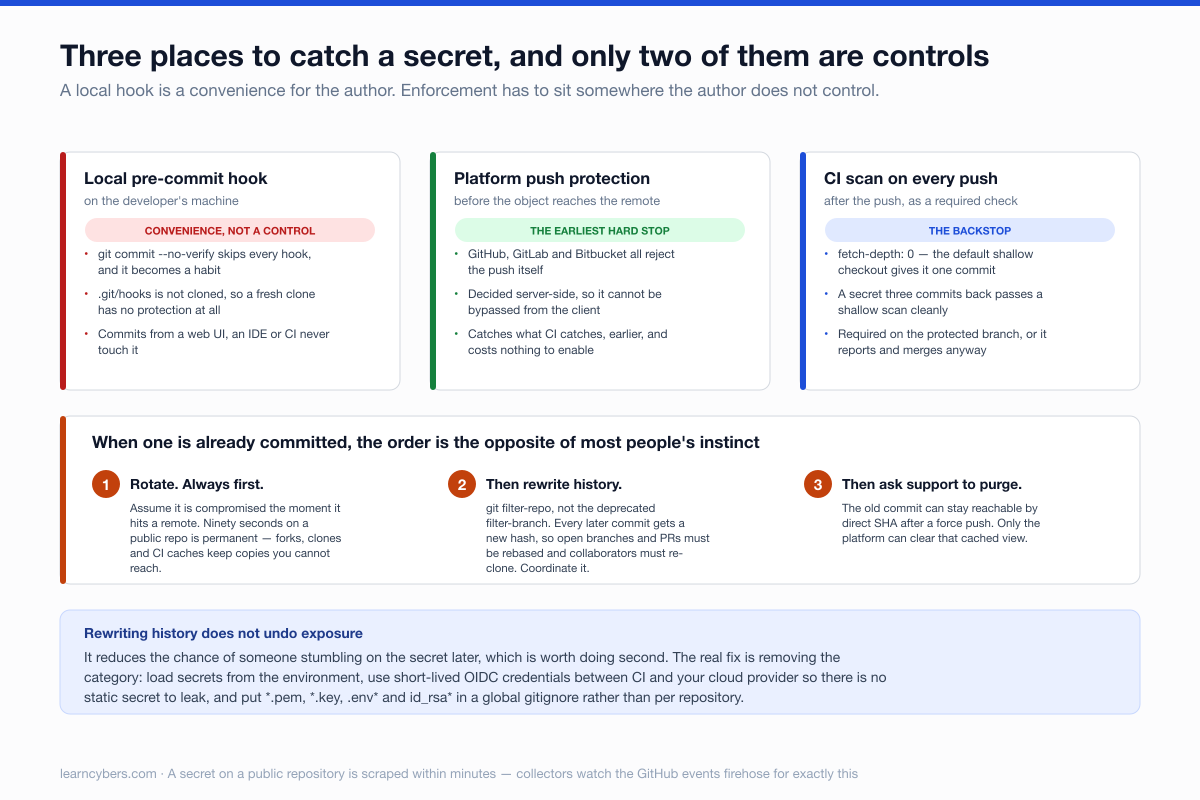
Three ways a local hook fails to stop a secret, none of them exotic:
git commit --no-verifyskips every hook. Developers reach for it when a hook is slow or noisy, and then it becomes habit.- Hooks live in
.git/hooks, which is not cloned. A new team member has no protection until they runpre-commit install, and nothing reminds them. - Commits made through a web UI, an IDE integration, or CI never touch the local hook at all.
Treat the local hook as fast feedback that saves the author embarrassment. The enforcement has to sit somewhere the author does not control.
Enforcement that cannot be bypassed
CI scanning on every push
# .github/workflows/secrets.yml
name: secret-scan
on: [push, pull_request]
jobs:
  gitleaks:
    runs-on: ubuntu-latest
    steps:
      - uses: actions/checkout@v4
        with:
          fetch-depth: 0          # full history, not just the tip commit
      - uses: gitleaks/gitleaks-action@v2
        env:
          GITHUB_TOKEN: ${{ secrets.GITHUB_TOKEN }}
fetch-depth: 0 is the line that matters. The default shallow checkout gives the scanner one commit, so a secret added three commits earlier in the same branch passes cleanly.
Make the check required on the protected branch, otherwise it reports and merges anyway.
Platform-side push protection
GitHub, GitLab and Bitbucket all offer scanning that rejects the push itself. This is the strongest of the three because it acts before the object reaches the remote at all. Where it is available, turn it on — it costs nothing and catches what CI catches, earlier.
Reducing false positives without going blind
A scanner everyone ignores is worse than none, and the usual cause is test fixtures and example configs tripping entropy rules.
# .gitleaks.toml
[extend]
useDefault = true

[[rules]]
id = "generic-api-key"
[rules.allowlist]
paths = [
  '''tests/fixtures/.*''',
  '''docs/examples/.*''',
]
Allowlist paths, not patterns. Allowlisting a pattern such as anything resembling a key disables the rule everywhere; allowlisting tests/fixtures/ keeps it active in the code that ships. And use obviously-fake values in fixtures — AKIAIOSFODNN7EXAMPLE is AWS's own documented example key and no scanner should alert on it.
When a secret is already committed
The order here is the whole point, and it is the opposite of most people's instinct.
Rotate first. Always. Assume the secret is compromised the moment it reaches a remote, and treat history rewriting as cleanup rather than remediation. A key that has been pushed to a public repository for ninety seconds should be considered public permanently — forks, clones, CI caches, and the platform's own unreferenced-object storage all keep copies you cannot reach.
Rewriting history does not undo exposure. It reduces the chance of someone stumbling on it later, which is worth doing second:
# git-filter-repo is the maintained tool; filter-branch is deprecated
pip install git-filter-repo
git filter-repo --path config/secrets.yml --invert-paths
Understand what this costs before running it. Every commit after the touched one gets a new hash, so every open branch and pull request must be rebased, every collaborator must re-clone, and any tag or commit reference in an issue, changelog or deployment record now points at nothing. On a shared repository, coordinate it.
Finally, ask GitHub Support to purge cached views — the old commit can remain reachable by direct SHA even after a force push, and only they can clear that.
Keeping secrets out in the first place
Scanning is a net under the real fix. The changes that remove the category:
- Load secrets from the environment, never from a committed file. Commit a
.env.examplewith empty values and add.envto.gitignore. - Use short-lived credentials. OIDC between CI and your cloud provider removes long-lived keys entirely, which means there is no static secret to leak.
- Put
*.pem,*.key,.env*andid_rsa*in a global gitignore, so protection is not per-repository. - Prefer a secret manager — Vault, AWS Secrets Manager, SOPS for encrypted files in git — over anything in plaintext.
A workable arrangement
- Local
pre-commitwith gitleaks — fast feedback, bypassable, that is fine. - Platform push protection where available — the earliest hard stop.
- CI scan with full history as a required check — the backstop that cannot be skipped.
- A documented rotation runbook, because at some point one gets through and the useful question is how quickly you can rotate rather than whether it ever happens.
The commands and configuration here are from current gitleaks and pre-commit documentation. Version numbers move; check the current release before pinning. Test the history-rewriting commands on a clone before running them anywhere shared — git filter-repo is deliberately hard to undo.