Running OpenClaw on a VPS: what a server can and cannot do
A VPS runs the OpenClaw gateway well and a local model badly, and the reason is memory bandwidth rather than CPU. The arithmetic that predicts tokens per second, and the three configurations worth considering.

The question gets asked in roughly this form: I have a VPS, can I run OpenClaw on it? The answer is yes, and it is also the wrong question, because "running OpenClaw" covers two very different jobs with very different hardware needs.
OpenClaw is a gateway that talks to a model. Those are separable. The gateway is a lightweight, always-on process that suits a VPS almost perfectly. The model is the part that needs memory bandwidth, and memory bandwidth is the one thing a general-purpose VPS does not have.
What a VPS is actually short of
It is not CPU cores, and it is usually not RAM. It is bandwidth to memory.
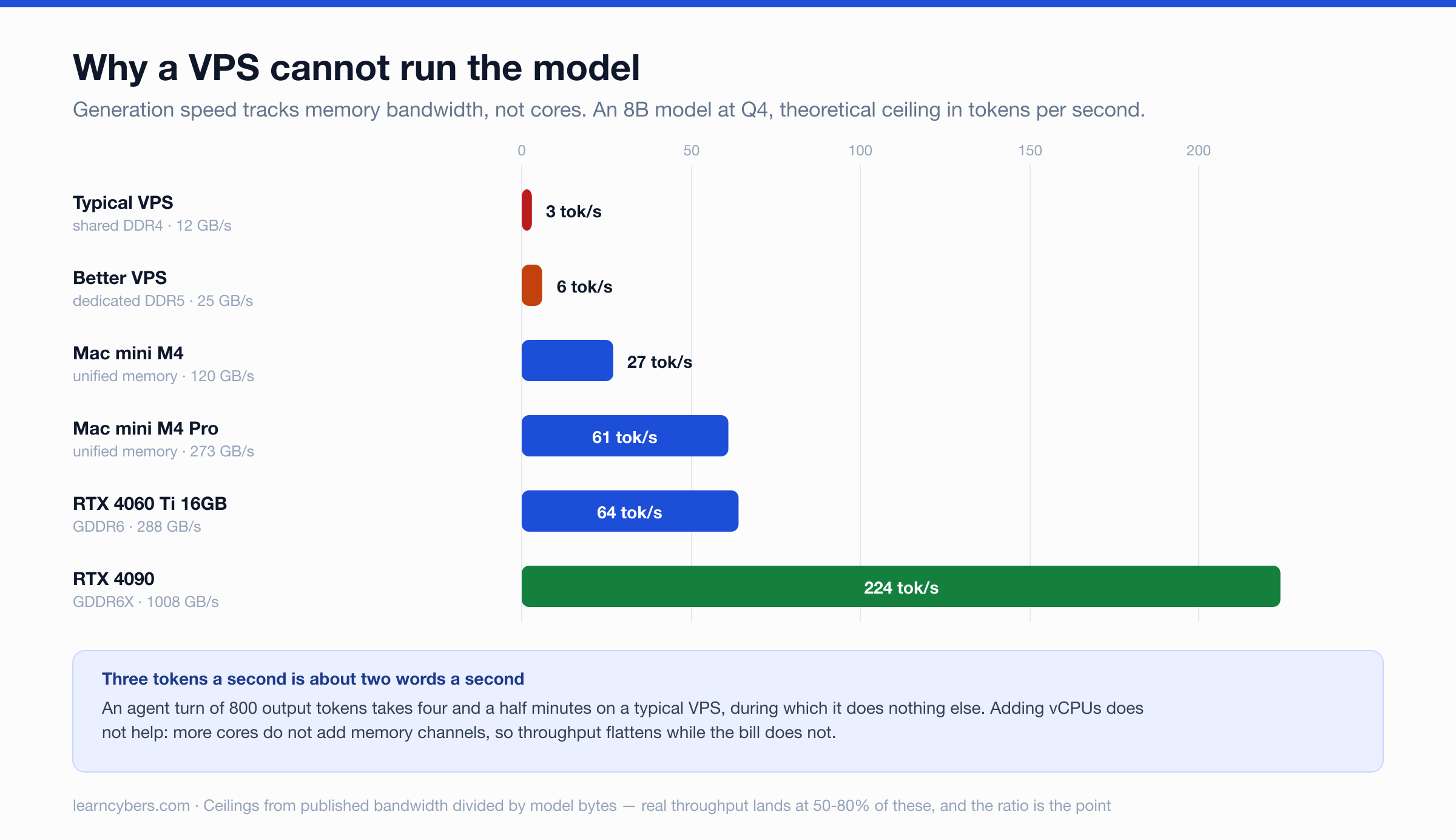
When a model generates text one token at a time — which is what a chat or agent turn is — every single token requires reading the entire set of model weights out of memory. Not a portion. All of them. That makes single-stream generation a memory-bandwidth problem rather than a compute problem, and it gives you a ceiling you can calculate before spending anything:
tokens per second ≈ memory bandwidth (GB/s) ÷ model size (GB)Run that against real platforms, for a model that fits comfortably in all of them:
Platform | Memory bandwidth | 8B at Q4 | 14B at Q4 | 32B at Q4 |
|---|---|---|---|---|
Typical VPS (shared DDR4) | ~12 GB/s | 3 t/s | 2 t/s | 1 t/s |
Better VPS (DDR5) | ~25 GB/s | 6 t/s | 3 t/s | 1 t/s |
Mac mini M4 | 120 GB/s | 27 t/s | 15 t/s | 7 t/s |
Mac mini M4 Pro | 273 GB/s | 61 t/s | 35 t/s | 15 t/s |
RTX 4060 Ti 16GB | 288 GB/s | 64 t/s | 37 t/s | 16 t/s |
RTX 4090 | 1008 GB/s | 224 t/s | 129 t/s | 56 t/s |
These are ceilings, not measurements. Real throughput generally lands at 50–80% of the figure, and a shared VPS can fall further when a neighbour is busy. But the ratio is the point, and the ratio is brutal: the same model that produces 27 tokens a second on a Mac mini produces about 3 on a typical VPS, and that is before any agent overhead.
Three tokens a second is roughly two words. An agent turn that reads a file, decides something and writes a reply might be 800 tokens of output — four and a half minutes, during which the agent is doing nothing else. Multi-step tasks compound it.
Why more vCPUs do not fix it
The intuitive response is to buy a larger instance. It helps less than expected, because adding cores does not add memory channels. Past a handful of threads, the cores spend their time waiting on the same memory bus, and throughput flattens.
This is also why a laptop with unified memory can beat a server with far more cores at this specific task. Apple silicon's advantage for local inference is not the neural engine; it is that the CPU and GPU share memory with 120–800 GB/s of bandwidth, where a conventional server pairs fast cores with comparatively slow DDR.
The split that actually works
Separate the two jobs and each lands on suitable hardware.
Gateway on the VPS, model hosted
This is the configuration most people should start with. The VPS runs the OpenClaw gateway — always on, publicly reachable, handling messaging integrations — and the model comes from a hosted API. The gateway is not bandwidth-hungry. It is a Node process, a SQLite index, and whatever tools you have enabled.
Budget 2–4 GB of RAM for the gateway alone, more if the browser tool is in regular use, since that starts a Chromium instance. A 2 vCPU / 4 GB VPS is a reasonable starting point and a 2 vCPU / 8 GB instance is comfortable.
Gateway on the VPS, model at home
The privacy-minded arrangement: the always-on gateway sits on the VPS, and it reaches a model running on hardware you own, over a private network such as WireGuard or Tailscale.
OpenClaw supports this directly. Custom providers trust their exact configured baseUrl origin, including loopback, LAN and tailnet hosts. Requests to other private origins need models.providers.<id>.request.allowPrivateNetwork: true set explicitly, which is a sensible default — it means a misconfigured provider cannot quietly reach into your network.
The trade-off is that your home machine must stay awake, and every token now crosses a network link. For a chat-style agent that is fine. For anything latency-sensitive it is noticeable.
Model on the VPS
Worth it only when the model is small and the work is not interactive. A 3B or 4B model at Q4 on a DDR5 instance will produce perhaps 10–15 tokens a second, which is usable for scheduled summarisation or classification where nobody is watching the cursor. It is not usable as an assistant you talk to.
GPU VPS instances exist and remove the bandwidth problem entirely, at a price that usually exceeds buying the hardware within a year of continuous use. They make sense for bursty workloads, not for an always-on personal assistant.
What OpenClaw's own documentation expects
The managed llama.cpp path checks available RAM, supported GPU memory and disk before recommending anything, rather than assuming a machine. Its curated recipes use a 64K context, and the smallest carries an 8 GiB host-memory floor. The documentation is explicit that these floors "do not guarantee fit or speed", which on a VPS is the operative warning — the memory can be there while the bandwidth is not.
It also notes that a model which loads and answers a short prompt may still fail an agent turn, because an agent turn carries the system prompt, tool schemas, history and output. On a slow VPS this appears as timeouts rather than errors. OpenClaw exposes models.providers.<id>.timeoutSeconds for exactly this, and the provider timeout must be raised before the agent timeout, since the provider timeout cannot extend the whole run.
Securing a gateway that faces the internet
A VPS-hosted gateway is reachable, which a laptop under a desk is not. That changes the threat model in ways worth being deliberate about.
The agent has tools. Depending on configuration those may include shell execution, file write, a browser and messaging. An agent that can be reached from the internet and can run commands is a remote execution service with a natural-language interface. Keep the gateway behind a private network or an authenticating proxy rather than exposing the port; prefer a tailnet to a public bind.
Local models also come without the provider-side filtering a hosted API applies. OpenClaw's documentation is direct about this and recommends keeping agents narrow and compaction on to limit the blast radius of prompt injection. If the agent reads untrusted input — a web page, an inbound message — assume that input is trying to instruct it, and let tool permissions rather than the model's judgement be the control.
Choosing, in order
- Decide where the model runs first. Everything else follows from it. Hosted API, home hardware, or on the VPS.
- If hosted: almost any 2 vCPU / 4 GB VPS runs the gateway. Spend the money on the model instead.
- If at home: size that machine on bandwidth, not cores. The table above is the first filter, and unified-memory machines punch well above their price for this.
- If on the VPS: keep the model at or below 4B, accept that it is for background work, and test a real agent turn before committing.
What is calculated here and what is not
The throughput figures are arithmetic — memory bandwidth divided by model size — using published bandwidth specifications and weight sizes derived from parameter counts and quantisation. They are theoretical ceilings and are labelled as such. We have not benchmarked these platforms ourselves, and any article quoting exact tokens-per-second without naming the quantisation, context length and backend is not giving you enough to act on.
The behavioural details — the hardware floor, the private-network trust rules, the timeout ordering, the safety guidance — are from OpenClaw's official documentation.
The useful thing to take away is the shape of the problem rather than any single number. Inference speed at batch size one tracks memory bandwidth almost linearly. Once that is clear, the question stops being "is my VPS big enough" and becomes "which of these two jobs am I actually putting on it".