OpenClaw hardware requirements: how to size a local model properly
The model file is the wrong number to budget for. At OpenClaw's default 64K context an 8B model's KV cache is 8 GiB — nearly double its quantised weights. The arithmetic, the documented floors, and the failure modes that appear after the model loads.
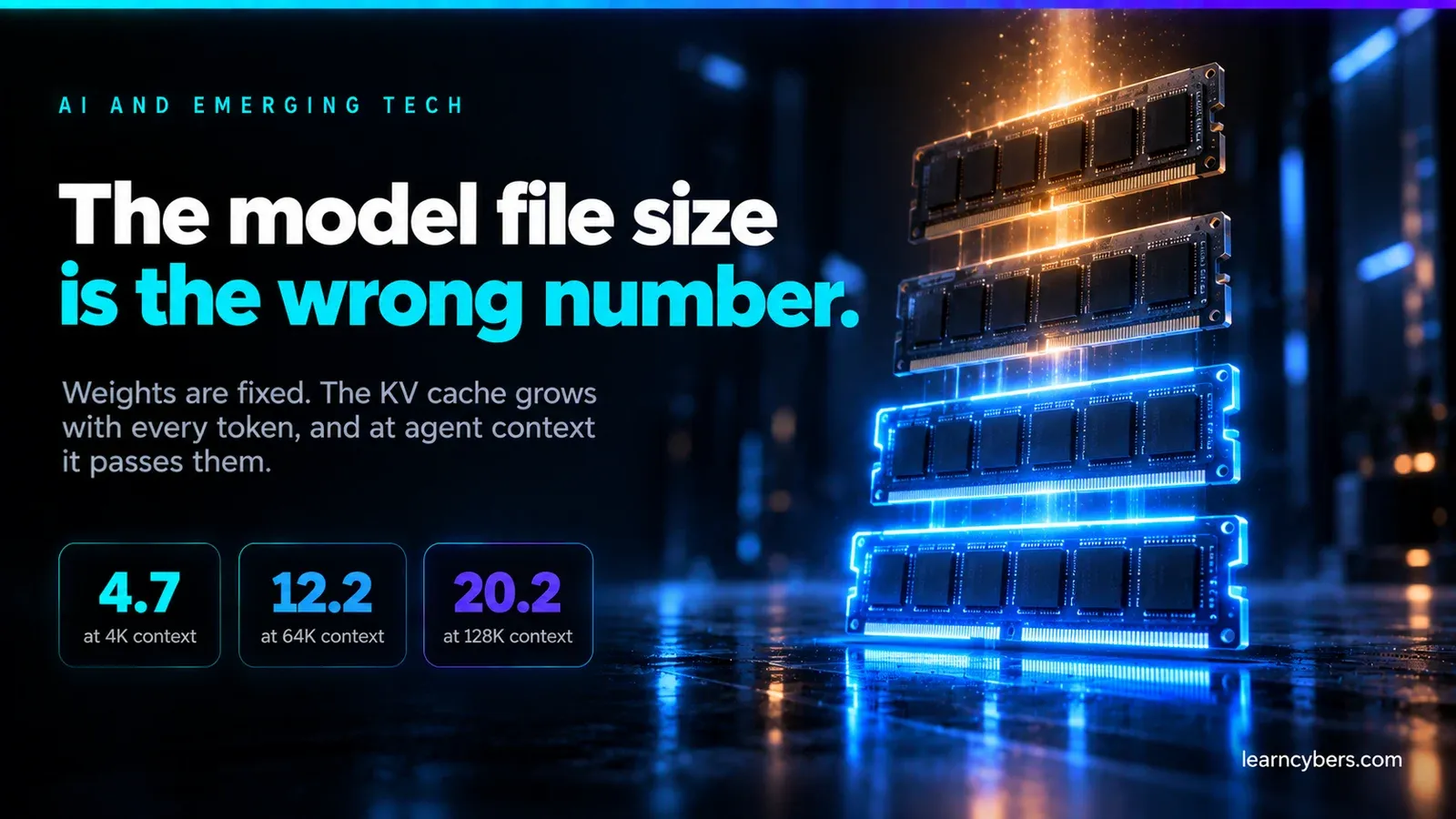
Most guides to running OpenClaw on a local model quote a memory figure and move on. The figure is usually the size of the model file, which is the one number that will not tell you whether the thing works. A model whose weights fit comfortably can still fail every agent turn, and the reason is almost always the same: nobody counted the context.
This article works through what actually occupies memory when OpenClaw drives a local model, where the official floors come from, and the failure modes that appear after the model loads successfully — which is precisely when people assume they are finished.
The short answer, and why it is not enough
OpenClaw's own documentation puts an 8 GiB host-memory floor on the smallest of its curated llama.cpp recipes, and notes that those recipes assume a 64K context. The documentation is careful to add that these floors "do not guarantee fit or speed".
That caveat is the whole subject. 8 GiB is the point below which setup will refuse to proceed. It is not the point at which an agent works well. The gap between the two is where almost every frustrated forum post lives.
What is actually resident
Four things want memory at the same time, and only the first is the one people budget for.
1. Model weights
Predictable, and the easy part. Weight size is parameter count times bits per weight, divided by eight. At the quantisation levels people actually use:
Model size | Q4_K_M | Q5_K_M | Q8_0 |
|---|---|---|---|
8B | 4.2 GiB | 5.1 GiB | 7.5 GiB |
14B | 7.3 GiB | 9.0 GiB | 13.0 GiB |
32B | 16.8 GiB | 20.5 GiB | 29.8 GiB |
70B | 36.7 GiB | 44.8 GiB | 65.2 GiB |
These are the numbers quoted in most hardware guides, and taken alone they are misleading.
2. The KV cache — usually the real constraint
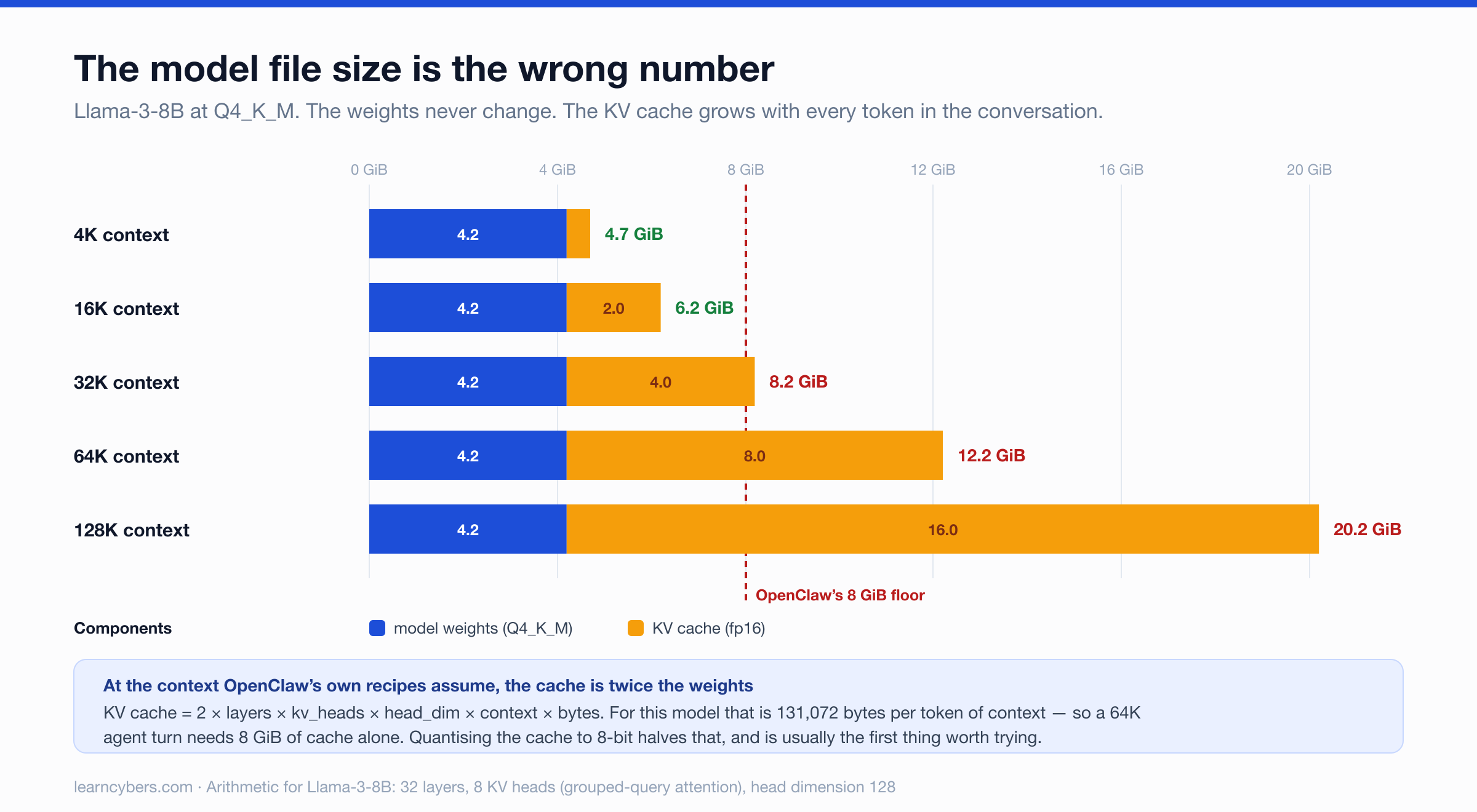
Every token the model has seen is held as a key and a value in every attention layer, for the whole conversation. That store grows linearly with context length, and at agent-sized contexts it routinely exceeds the weights.
The size is exact and worth computing yourself:
bytes = 2 × layers × kv_heads × head_dim × context_length × bytes_per_elementThe leading 2 covers keys and values. Take Llama-3-8B, which has 32 layers, 8 key/value heads (it uses grouped-query attention, so this is far smaller than its 32 attention heads) and a head dimension of 128. In fp16:
2 × 32 × 8 × 128 × 2 bytes = 131,072 bytes per token = 128 KiB/tokenWhich gives:
Context | KV cache (fp16) | KV cache (8-bit) |
|---|---|---|
4,096 | 0.50 GiB | 0.25 GiB |
16,384 | 2.00 GiB | 1.00 GiB |
65,536 | 8.00 GiB | 4.00 GiB |
At the 64K context OpenClaw's curated recipes use, an 8B model's KV cache is 8 GiB — roughly double the 4.2 GiB of its own quantised weights. The model file is no longer the dominant cost. The conversation is.
This is the single most useful thing to internalise, because it inverts the usual advice. Someone with 16 GiB who has been told "an 8B model needs about 5 GB" will load it happily, watch it answer a one-line prompt perfectly, and then watch it die partway through the first real agent task.
Two levers follow directly. Quantising the KV cache to 8-bit halves it, at a quality cost that is small for most work. Reducing context is far more effective still, because the relationship is linear: dropping from 64K to 16K cuts 8 GiB to 2 GiB.
3. Everything else on the host
OpenClaw is not only a model. The Gateway process, a Node runtime, the SQLite index, and — if you use the browser tool — a Chromium instance are all resident while the model is loaded. On a machine with unified memory, that competes directly with the model rather than sitting in separate VRAM.
Budget one to three GiB for this before the model is considered, more if the browser tool is in regular use.
4. Headroom for the turn itself
The documentation is explicit that a model which "loads or answers a short prompt may still fail an agent turn", and the reason is that an agent turn is not a short prompt. It carries the system prompt, the tool schemas, the conversation history, any retrieved documents, and the model's own output. Tool schemas in particular are large, and OpenClaw ships a lot of tools.
How OpenClaw behaves when context runs short
This is documented behaviour that almost nobody writing about OpenClaw hardware mentions, and it explains a specific class of confusing failure.
OpenClaw runs a context-window preflight before a turn. It warns below 20% remaining, with an 8k floor, and hard-blocks below 10%, with a 4k floor. Those thresholds come from the model's detected context window, or from a per-model contextTokens cap if you have set one.
The practical consequence: if you declare a 196,608-token context window in your provider config but your server was actually started with 8,192, OpenClaw sizes its preflight against the number you declared. It will let turns through that the server cannot serve, and the failure will surface as a server-side error rather than a clear "you are out of context" message. Declared context and served context must match.
Choosing a backend
OpenClaw documents several, and the choice is mostly about who manages the model rather than about speed.
- Managed llama.cpp — install the plugin, run
openclaw onboard, choose Managed local server. This is the only path that inspects your actual available RAM, GPU memory and disk before recommending a model, and it verifies a real tool call before switching your default. For a first local setup this removes most of the guesswork. - LM Studio — a GUI loader, and it supports the Responses API, which keeps reasoning separate from final text. That separation matters if you deliver to WhatsApp, where you want only the final text sent.
- Ollama — CLI workflow, large model library, runs as a systemd service.
- MLX, vLLM, SGLang — for higher-throughput serving behind an OpenAI-compatible endpoint.
- Any OpenAI-compatible proxy — LiteLLM and similar, using
openai-completionsunless the backend explicitly documents/v1/responsessupport.
One configuration detail causes repeated trouble: in a provider's model list, the id is provider-local and must not carry the provider prefix. For an MLX server started with mlx_lm.server --model mlx-community/Qwen3-30B-A3B-6bit, the id is mlx-community/Qwen3-30B-A3B-6bit while the reference you set as primary is mlx/mlx-community/Qwen3-30B-A3B-6bit.
The WSL2 crash loop
This one deserves its own heading because the symptom looks nothing like its cause.
The official Ollama Linux installer enables a systemd service with Restart=always. On WSL2 with an NVIDIA GPU, that service can reload the last-used model during boot and pin host memory before anything else starts. The result is repeated VM restarts — a machine that appears to be failing at the operating system level, with no obvious connection to a model server.
If you are running OpenClaw under WSL2 with CUDA and the VM restarts in a loop, disable the Ollama service autostart before looking anywhere else.
When the model loads but agent turns fail
A model that answers a plain prompt has proved almost nothing about its ability to run an agent turn. OpenClaw provides two probes that isolate where the failure is, and running them in order saves a great deal of time.
# Does the model respond at all? No tools, no agent context.
openclaw infer model run --local --model <provider/model> --prompt "Reply with exactly: pong" --json

# Does Gateway routing, auth and provider selection work?
# Still skips transcript, tools and MCP servers.
openclaw infer model run --gateway --model <provider/model> --prompt "Reply with exactly: pong" --json
If both pass and real turns still fail, the problem is in tools or context budget rather than in the model or the connection. Three documented causes account for most of it.
Tool calls arriving as text. Smaller models often emit something that looks like a tool call — JSON, XML, or ReAct-style text — without it being a structured invocation. OpenClaw leaves it as text and logs a warning rather than executing it, which is the correct and safe behaviour. The documentation is blunt about the wrong fix: do not add a proxy that converts assistant text into tool execution. Fix the server's chat template and parser instead.
Strict message shapes. Some servers accept only a string for messages[].content and reject structured content arrays, and some reject any message key beyond role and content. These surface as validation errors and are fixed per model with compat.requiresStringContent and compat.strictMessageKeys.
Too many tool schemas for a small model. Local routes use structured Tool Search by default, which defers schemas rather than putting them all in the prompt. Where that is not enough, lean mode removes the largest and most distracting tools — browser, automations, message, image and music and video generation, text-to-speech, and PDF — while leaving read, write, edit, exec, apply_patch, memory and session tools available.
Lean mode is a troubleshooting override, not a default. Turn it on only after you have confirmed the Gateway probe passes and normal turns still misbehave.
Practical configurations
These follow from the arithmetic above rather than from testing, and the context figure is doing most of the work in each one.
16 GiB unified memory or 8 GiB VRAM. An 8B model at Q4_K_M with context held to 16K: roughly 4.2 GiB of weights plus 2 GiB of KV cache, leaving room for the Gateway and the operating system. Workable for short, well-scoped tasks. The 64K context of the default recipes will not fit here, and trying to force it is the most common way this configuration fails.
32 GiB unified memory or 24 GiB VRAM. A 14B model at Q4_K_M with 32K context, or an 8B at the full 64K. This is roughly where multi-step agent work stops feeling like a fight.
64 GiB and above. A 32B model at Q4_K_M with a large context, which is where local tool-calling reliability becomes genuinely comparable to a hosted model for routine work.
Mixture-of-experts models change this calculus and are worth checking separately: a model like Qwen3-30B-A3B has 30B total parameters but activates only about 3B per token, so throughput is far better than the weight size suggests — while the memory required to hold the weights is not reduced at all.
One thing local models do not give you
Running the model yourself removes the provider's safety filtering along with the provider. OpenClaw's documentation states this plainly and recommends keeping agents narrow and compaction on to limit the blast radius of prompt injection.
This deserves more weight than it usually gets in hardware discussions. An agent with shell access, a browser tool and messaging integrations is a substantial capability. When the model directing it has no upstream filtering and is small enough to be easily confused, tool permissions stop being a configuration detail and become the main control you have.
What is measured here and what is not
The memory arithmetic is arithmetic: the KV-cache formula and the weight sizes are derived from published model architectures and can be checked against any model card. The hardware floors, backend behaviour, context preflight thresholds, WSL2 warning and compatibility flags are from OpenClaw's official documentation.
The configuration recommendations are reasoned from those figures, not benchmarked on our own hardware. We have not measured tokens per second on these machines, and any article quoting throughput figures without saying which quantisation, context length and backend produced them is not telling you enough to be useful.
If you are sizing a purchase, the order that matters is: decide your context length first, compute the KV cache from it, add the weights, then add three GiB for everything else. The number you arrive at will be larger than the one on the model card, and it will be the one that determines whether the thing works.