S3 bucket security: the ten mistakes that still expose data
Common S3 misconfigurations and how to fix every one of them
Buckets have been private by default since 2023 and S3 still leaks. What exposes data now is policies written under deadline, cross-account grants with no conditions, and presigned URLs with week-long expiries.
S3 buckets have been private by default since 2023, and S3 misconfiguration is still a reliable source of data exposure. That combination is the interesting part: the default stopped being the problem, and everything that came after it did not.
What exposes data now is rarely a bucket someone deliberately made public. It is a policy written to unblock a deployment at 6pm, a bucket created by Terraform before the account-level guardrail existed, a cross-account grant with no conditions on it, or a presigned URL with a seven-day expiry sitting in a Slack message. The defaults improved; the ways around the defaults did not.
Start with the account-level control
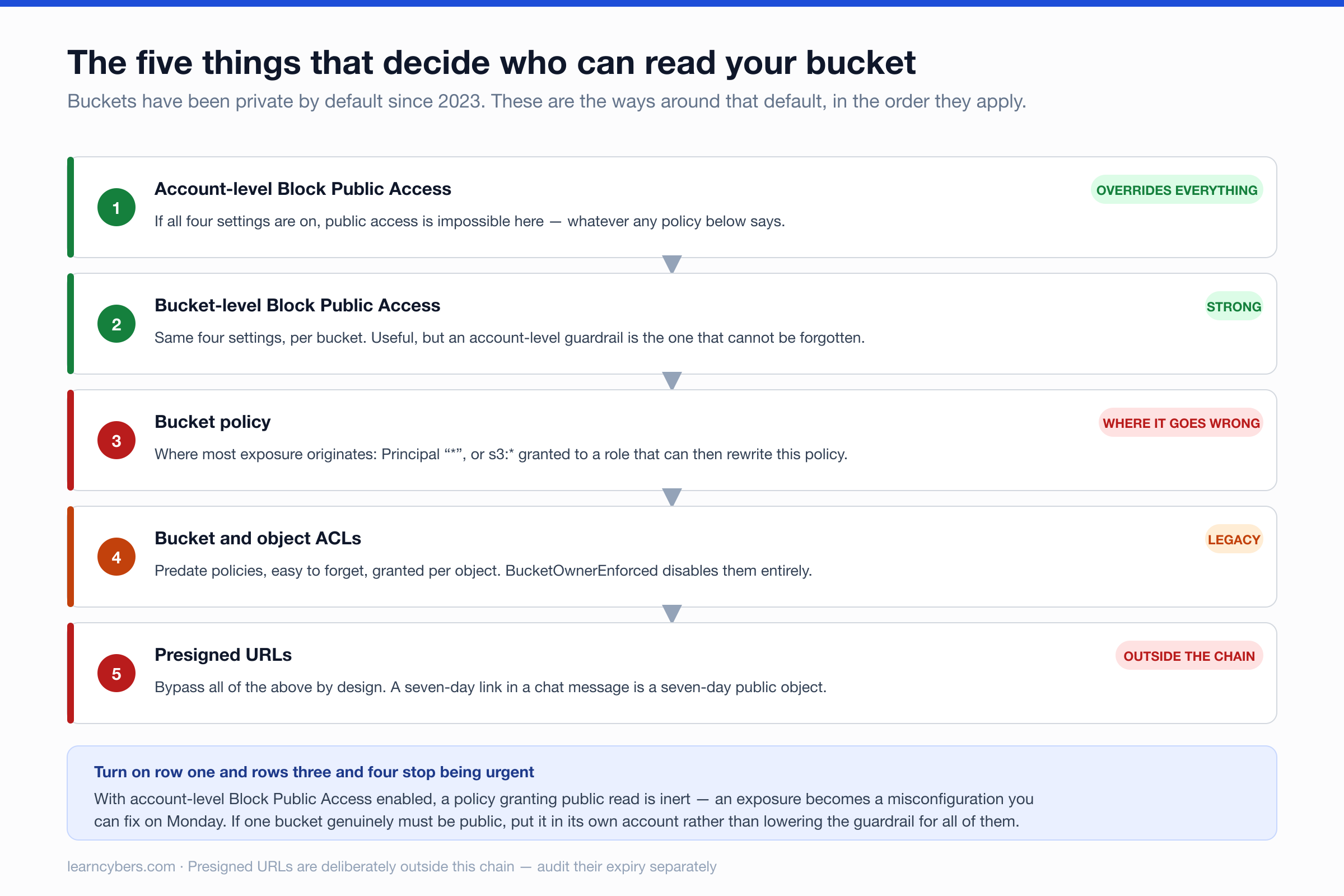
Before auditing individual buckets, check the setting that makes most of this moot. S3 Block Public Access at the account level overrides bucket policies and ACLs — a bucket cannot be made public while it is on, regardless of what a policy says.
aws s3control get-public-access-block --account-id "$(aws sts get-caller-identity --query Account --output text)"All four settings should be true. If they are, a policy granting public read is inert, which converts an urgent exposure into a misconfiguration you can fix on Monday. If you genuinely need one public bucket — a static site, public assets — put it in a separate account rather than turning the account-level guardrail off for everything.
The mistakes, and how to find them
1. Public read through a policy or ACL
The classic. A policy with "Principal": "*" and s3:GetObject, or a legacy ACL granting AllUsers.
# Every bucket, with its public-access-block status
for b in $(aws s3api list-buckets --query 'Buckets[].Name' --output text); do
  echo -n "$b: "
  aws s3api get-public-access-block --bucket "$b" \
    --query 'PublicAccessBlockConfiguration.BlockPublicPolicy' --output text 2>/dev/null \
    || echo "NO BLOCK CONFIGURED"
done
ACLs are worth a separate pass, because they predate policies and are easy to forget. BucketOwnerEnforced object ownership disables ACLs entirely, which is the right end state for nearly every bucket.
2. Wildcards in actions or resources
A policy granting s3:* to a role is not public, but it is excessive: it includes DeleteBucket, PutBucketPolicy and PutBucketAcl. A compromised application credential with s3:* can rewrite the bucket's own policy and make it public — so the grant you audited is not the grant that ends up applying.
Grant the verbs you use. If an application reads and writes objects, that is GetObject, PutObject and usually ListBucket — not administrative actions on the bucket itself.
3. Cross-account access without conditions
Granting another account access without an external ID or condition is the confused-deputy problem. Any principal in that account, including ones added later by someone you have never met, inherits the grant.
"Condition": {
  "StringEquals": { "sts:ExternalId": "a-value-you-generated" },
  "ArnLike": { "aws:PrincipalArn": "arn:aws:iam::123456789012:role/SpecificRole" }
}
Scope to the role, not the account. Third-party vendors asking for cross-account access should supply an external ID; one that does not ask for one is worth a question.
4. No encryption enforcement
Default encryption means new objects are encrypted. It does not stop a client uploading with encryption explicitly disabled, and it does nothing about objects already there. Deny the unencrypted write:
{
  "Effect": "Deny",
  "Principal": "*",
  "Action": "s3:PutObject",
  "Resource": "arn:aws:s3:::my-bucket/*",
  "Condition": { "StringNotEquals": { "s3:x-amz-server-side-encryption": "aws:kms" } }
}
Be clear about what this buys you. SSE-S3 protects against someone walking out with a disk. It does not protect against a credential with GetObject, because decryption is transparent to anyone authorised to read. SSE-KMS with a customer-managed key is different in one useful way: the KMS key policy is a second authorisation boundary, and key use is logged separately in CloudTrail.
5. Versioning off, or on without MFA Delete
Without versioning, an overwrite or delete is final — which is precisely what ransomware against S3 looks like. With versioning, the old object is still there.
Versioning alone is not enough, though, because a credential that can delete objects can usually delete versions too. MFA Delete closes that, and has a practical catch worth knowing before you plan around it: it can only be enabled by the account root user, using the root user's MFA device, via the CLI or API rather than the console.
aws s3api put-bucket-versioning --bucket my-bucket \
  --versioning-configuration Status=Enabled,MFADelete=Enabled \
  --mfa "arn:aws:iam::123456789012:mfa/root-account-mfa-device 123456"
Pair versioning with a lifecycle rule that expires noncurrent versions, or the storage bill grows indefinitely.
6. No logging, or logging you cannot search
Server access logging is cheap and best-effort. CloudTrail data events for S3 are the ones that answer "who read this object", and they are off by default because they cost money at volume.
Turn data events on for buckets holding anything sensitive. The question after an incident is always which objects were read, and without data events the honest answer is that you cannot tell.
Keep the log destination in a different bucket — ideally a different account — and confirm it is not itself public. A public logging bucket is its own disclosure, since access logs list object keys.
7. Presigned URLs with long expiries
A presigned URL is a bearer credential in a link. Anyone holding it has the access it encodes, for as long as it lasts, and it will be pasted into a ticket or a chat.
Generate them with the shortest expiry the workflow tolerates — minutes, not days. Note also that a URL signed by a long-lived IAM user credential outlives most attempts to revoke it; signing with short-lived STS credentials means the URL dies with the session.
8. Buckets nobody owns
Most estates have buckets created for a migration in 2021 that nobody has looked at since. They hold real data, no owner, and no review.
# Buckets with no tags — a decent proxy for unowned
for b in $(aws s3api list-buckets --query 'Buckets[].Name' --output text); do
  aws s3api get-bucket-tagging --bucket "$b" >/dev/null 2>&1 || echo "untagged: $b"
done
Require an owner tag on creation and audit for its absence. Deleting an unknown bucket is risky; leaving it is riskier.
9. No TLS requirement
S3 accepts plain HTTP unless told otherwise. One statement fixes it:
{
  "Effect": "Deny",
  "Principal": "*",
  "Action": "s3:*",
  "Resource": ["arn:aws:s3:::my-bucket", "arn:aws:s3:::my-bucket/*"],
  "Condition": { "Bool": { "aws:SecureTransport": "false" } }
}
10. Public access blocked at the bucket but not the account
Per-bucket settings are per-bucket. The next bucket someone creates starts without them, and the one after that. Account-level Block Public Access is the control that survives people, which is why it belongs at the top of this list rather than the bottom.
Running this as a check rather than a one-off
Manual audits drift. Three things give you continuous coverage without much effort:
- AWS Config rules —
s3-bucket-public-read-prohibited,s3-bucket-server-side-encryption-enabled,s3-bucket-ssl-requests-onlyevaluate continuously and flag drift. - IAM Access Analyzer — identifies buckets accessible from outside your account or organisation, which catches the cross-account grants a policy read can miss.
- Service control policies — at the organisation level, deny disabling Block Public Access at all. This is the only control on the list that an engineer under deadline pressure cannot route around.
Scope and sources
The policy syntax, API calls and behaviours described here are from AWS's published documentation for S3, KMS and IAM as of September 2026. AWS changes defaults — public access blocking and ACL disablement both became defaults for new buckets after years of not being — so verify current behaviour for anything created a while ago rather than assuming it inherited today's settings.
These commands are read-only audits and safe to run. The policy examples are illustrative: test any Deny statement against a non-production bucket first, because a Deny with a slightly wrong condition locks out your own applications immediately and, in the worst case, locks you out of fixing the policy.