S3 and CloudFront: The Fork That Decides Whether /about/ Works
Step-by-step guide to hosting a fast, secure static website on AWS
Two S3 endpoints, two behaviours, and most guides pick one without saying which. One gives you working directory URLs and a public bucket; the other gives you a private bucket and a 403 on every folder path.
You can have a static site on S3 behind CloudFront in about twenty minutes. You can also spend the next two days working out why /about/ returns 403 while /about/index.html works perfectly, why your certificate will not attach, and why the site still serves last week's HTML.
All three have the same root cause: there are two completely different ways to connect CloudFront to S3, they behave differently, and most guides pick one without telling you which.
The fork everything else hangs on
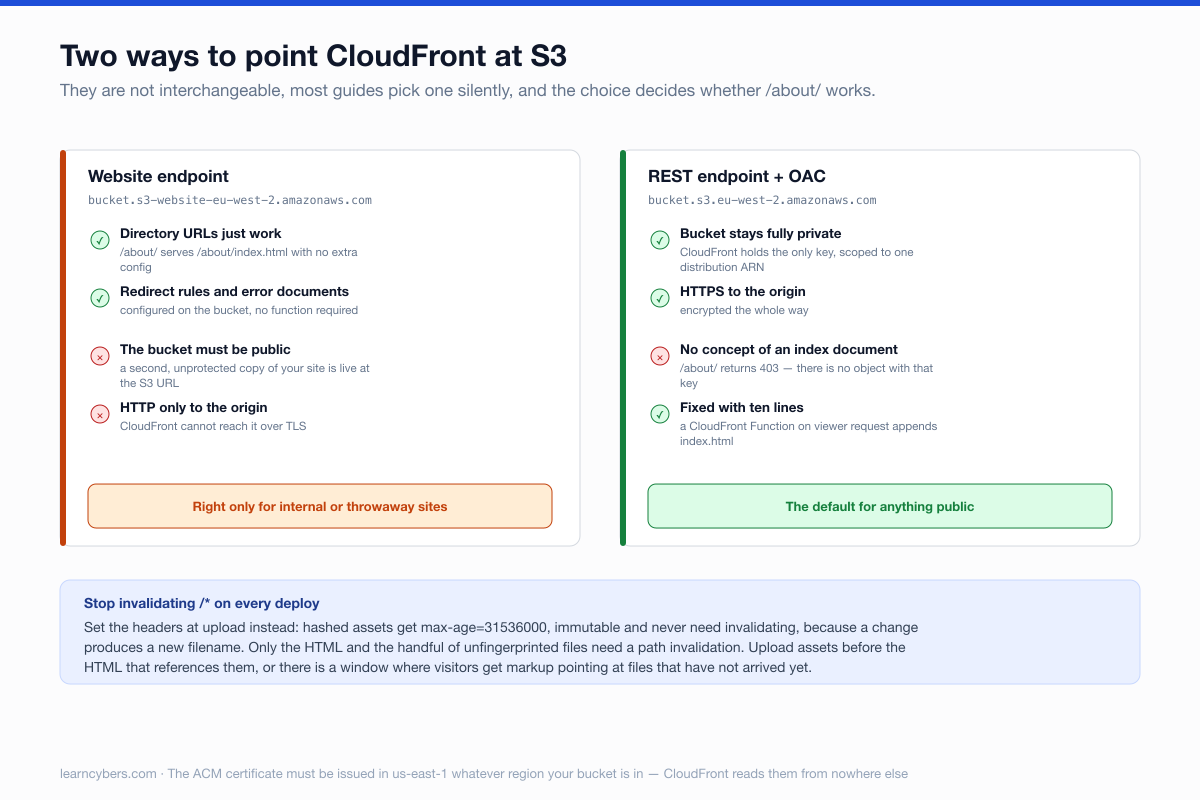
An S3 bucket exposes two endpoints, and they are not interchangeable.
The website endpoint (bucket.s3-website-region.amazonaws.com) is a small web server. It resolves index documents in subdirectories, so /about/ serves /about/index.html by itself. It supports redirect rules and a custom error document. It only speaks HTTP, and it requires the bucket to be publicly readable.
The REST endpoint (bucket.s3.region.amazonaws.com) is the storage API. It speaks HTTPS, it works with Origin Access Control so the bucket can stay completely private, and it has no concept of an index document. Ask it for /about/ and it looks for an object with that exact key, does not find one, and returns 403.
Almost every guide uses the REST endpoint — correctly, because a public bucket is the thing you are trying to avoid — and then never mentions that directory URLs are now broken.
Why not just use the website endpoint?
It is a fair question, because it solves the directory problem for free and the setup is shorter. Three reasons it is the wrong default.
The bucket has to be public. Not "public-ish" — every object readable by anyone who knows the bucket name, and bucket names are guessable. You now have two live copies of your site: the one behind your CDN with your headers and your TLS, and a raw one on s3-website with neither. Search engines find the second one, and you get duplicate content you did not know you published.
The origin leg is unencrypted. CloudFront can only reach a website endpoint over HTTP. Traffic between the edge and your bucket crosses AWS's network in the clear. For a public marketing site that is a low-severity finding; on any kind of audit it is still a finding.
You cannot use Origin Access Control. OAC is what lets CloudFront hold the only key to your bucket, and it is incompatible with the website endpoint by design.
The website endpoint is genuinely the right answer in one case: a purely internal or temporary site where a public bucket is acceptable and you want redirect rules without writing a function. Otherwise, take the REST endpoint and spend the ten lines of JavaScript.
The recommended setup
Private bucket, REST endpoint, Origin Access Control. Note that OAC replaced Origin Access Identity; OAI still works but is legacy and new distributions should not use it.
aws s3 mb s3://example-site --region eu-west-2
aws s3api put-public-access-block --bucket example-site \
  --public-access-block-configuration \
  "BlockPublicAcls=true,IgnorePublicAcls=true,BlockPublicPolicy=true,RestrictPublicBuckets=true"
The bucket policy grants CloudFront and nothing else. The AWS:SourceArn condition is the part that matters — without it you have authorised any CloudFront distribution, including someone else's:
{
  "Version": "2012-10-17",
  "Statement": [{
    "Effect": "Allow",
    "Principal": { "Service": "cloudfront.amazonaws.com" },
    "Action": "s3:GetObject",
    "Resource": "arn:aws:s3:::example-site/*",
    "Condition": {
      "StringEquals": {
        "AWS:SourceArn": "arn:aws:cloudfront::111122223333:distribution/E1ABCDEFGHIJKL"
      }
    }
  }]
}
Fixing directory URLs
This is the missing piece. A CloudFront Function on viewer request rewrites the path before the origin ever sees it — sub-millisecond, and free at the volumes a static site will see.
function handler(event) {
  var req = event.request;
  var uri = req.uri;

  if (uri.endsWith('/')) {
    req.uri = uri + 'index.html';            // /about/  -> /about/index.html
  } else if (!uri.includes('.')) {
    req.uri = uri + '/index.html';           // /about   -> /about/index.html
  }
  return req;
}
Attach it to the default behaviour as a viewer request function. Attaching it to origin request also works but runs after the cache lookup, so you end up caching both the rewritten and unrewritten forms.
A single-page application is a different problem with a different fix. There, every unknown path should serve the app shell, which is a custom error response mapping 403 and 404 to /index.html with a 200 status. Do not do this on a content site — it turns every genuine 404 into a soft 200, which Google treats as a quality problem and which hides broken links from you permanently.
The certificate has to live in Virginia
CloudFront only reads ACM certificates from us-east-1, whatever region your bucket and your users are in. Request it there, validate by DNS, and attach it.
aws acm request-certificate --region us-east-1 \
  --domain-name example.com \
  --subject-alternative-names www.example.com \
  --validation-method DNS
This catches everybody once. If your certificate is issued and healthy but CloudFront will not offer it in the dropdown, this is why.
Caching, and why your site still shows the old version
The default instinct after a deploy is to invalidate /*. It works, it is slow, and beyond the first thousand paths a month it costs money on every deploy forever. It is also unnecessary if you set the headers correctly at upload time.
Split your files into two groups. Anything with a content hash in the filename can be cached permanently, because a change produces a new filename. Everything else — the HTML that points at them — must never be cached at the edge for long.
# 1. Hashed assets: immutable, cache for a year, no invalidation ever needed
aws s3 sync ./dist s3://example-site --delete \
  --exclude "*.html" --exclude "service-worker.js" \
  --cache-control "public,max-age=31536000,immutable"

# 2. HTML: always revalidate
aws s3 sync ./dist s3://example-site --delete \
  --exclude "*" --include "*.html" --include "service-worker.js" \
  --cache-control "public,max-age=0,must-revalidate"

# 3. Invalidate only the handful of files that are not fingerprinted
aws cloudfront create-invalidation \
  --distribution-id E1ABCDEFGHIJKL \
  --paths "/" "/index.html" "/*/index.html" "/service-worker.js"
Note the order: assets are uploaded before the HTML that references them. Reverse it and there is a window where a visitor gets new HTML pointing at files that have not arrived yet.
Turn on automatic compression in the distribution while you are there. CloudFront will serve Brotli or gzip based on the request headers, and on a text-heavy site it is the single largest transfer saving available for one checkbox.
The headers worth adding before launch
CloudFront response headers policies let you attach security headers without touching the origin, and there is a managed policy that covers the basics. At minimum:
Strict-Transport-Security: max-age=63072000; includeSubDomains; preload
X-Content-Type-Options: nosniff
Referrer-Policy: strict-origin-when-cross-origin
Content-Security-Policy: default-src 'self'; object-src 'none'; frame-ancestors 'none'
Also set the distribution to redirect HTTP to HTTPS rather than allowing both, and set a default root object of index.html so the apex URL works before your function gets a chance to run.
A deployment checklist that survives the first month
- Block Public Access on, bucket policy scoped to one distribution ARN. If your bucket is publicly readable, someone will eventually find the direct S3 URL and you will be serving from two places with different cache behaviour.
- Versioning on the bucket. A bad
sync --deleteis how static sites disappear. Versioning makes that recoverable and costs almost nothing at this scale. - A second distribution for staging, with the same function and headers, so you are not testing the CDN configuration in production.
- Access logs somewhere. Standard CloudFront logs to S3 are cheap, and the first time you are debugging a caching problem you will want them and they will not be retroactive.
- Budget alarm. Static hosting is genuinely inexpensive, right up until something links your video from a forum.
Scope
Console layouts, managed policy names and the exact CLI flags move; the structure — private bucket, OAC, viewer-request rewrite, us-east-1 certificate, headers set at upload — has been stable for several years and is the part worth remembering. Prices and free-tier allowances change and are not quoted here.
Everything above assumes a bucket and distribution you own. The bucket policy example uses a placeholder account ID and distribution ID; substitute your own rather than copying it as it stands.