CloudFront vs Cloudflare: The Hop Everybody Forgets to Price
Feature-by-feature comparison for developers choosing a content delivery network
CloudFront meters delivery and gives you free origin egress from AWS. Cloudflare does not meter delivery but your S3 bucket still bills you on every cache miss. Which one wins comes down to a number most people have never measured.

These two products get compared as though they are the same kind of thing. They are not. CloudFront is a content delivery network you point at an origin and configure. Cloudflare is a network you move your entire domain onto, which happens to include a CDN. That difference decides more than any feature table, and it is why the honest answer to "which is better" depends almost entirely on where your origin already lives.
There is also a cost trap in the obvious combination — Cloudflare in front of an S3 bucket — that catches people every month. That is the part to read even if you have already decided.
The billing models are not comparable, and that is the point
CloudFront meters. You pay per gigabyte delivered to the internet, at a rate that varies by geography, plus a charge per ten thousand requests. There is a perpetual free tier — currently 1 TB of data transfer out and 10 million requests a month — and above that the bill scales with traffic, in public, in a calculator you can run before you commit.
Cloudflare does not meter bandwidth on its standard plans. Free, Pro and Business are flat monthly prices and your gigabytes are not counted. That is not a promotional rate, it is the business model: Cloudflare's costs are dominated by peering and hardware it has already paid for, so bandwidth is not the thing it sells.
The qualifier worth knowing is in Cloudflare's terms — the unmetered service is for serving web content. An account pushing large volumes of video or large file downloads through a Free or Pro plan can be asked to move onto Stream, R2 or an Enterprise agreement. For a normal site, including a busy one, this never comes up. For a download mirror or a video library, plan for it rather than discovering it.
The hidden cost: origin egress
Here is the arrangement that looks cheapest and often is not.
Data transfer from an AWS origin — S3, EC2, an ELB — into CloudFront is free. AWS does not bill the hop from its own storage to its own CDN. So a static site on S3 behind CloudFront pays CloudFront's delivery rate and nothing for the origin fetch.
Put Cloudflare in front of the same S3 bucket and that hop is no longer internal. Every cache miss pulls from S3 across the public internet, and AWS bills it at standard egress rates. Your CDN bill is now zero and your S3 bill is not.
How much that matters depends entirely on your cache hit ratio, which is the number most people have never looked at. At 95% hit ratio on a site serving mostly static assets, the origin fetches are a rounding error and Cloudflare is dramatically cheaper. At 60% — which is what you get with lots of unique URLs, short TTLs, or a long tail of rarely-requested files — you are paying AWS egress on four out of every ten requests, and the flat-rate CDN in front of it has not saved you anything.
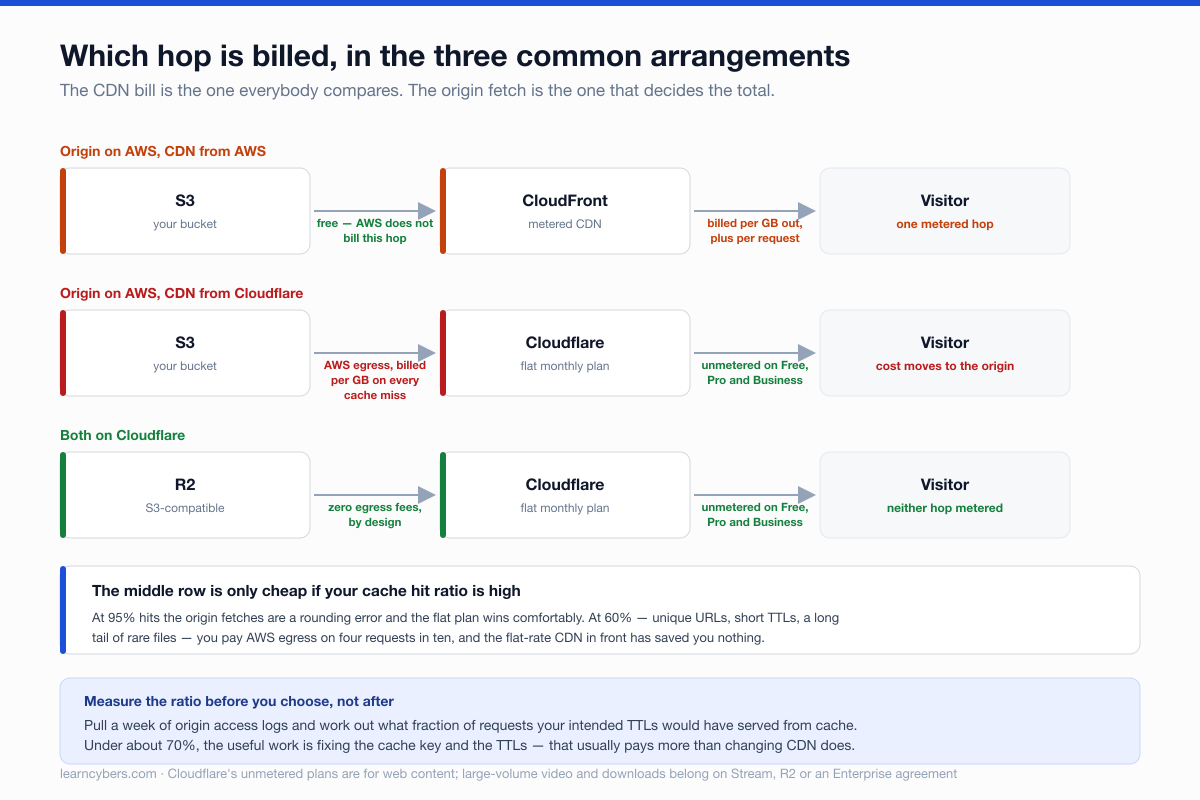
Cloudflare's own answer to this is R2, its S3-compatible object store with no egress fees at all. If you are choosing Cloudflare and your assets are static, moving the bucket is usually the decision that actually makes the economics work. Keeping the bucket on S3 and putting Cloudflare in front of it is the configuration that quietly costs the most.
Cloudflare does not cache your HTML by default
This is the single most common reason someone puts Cloudflare in front of a site and reports that nothing got faster.
By default, Cloudflare caches based on file extension — images, CSS, JavaScript, fonts, archives. HTML is not on that list. Your pages still go to origin on every request, so time to first byte is unchanged, and the only thing that improved is asset delivery. The dashboard shows a healthy cache hit ratio, because it is counting the assets.
Caching HTML is a Cache Rule with "Eligible for cache" set, and it is a deliberate decision rather than an oversight in the defaults — caching HTML on a site with logged-in users is how you serve one person's session to another. If you do it, pair it with a bypass for your session cookie:
# Cache Rule expression — cache HTML, but never for a signed-in visitor
(http.request.uri.path matches "^/.*" and not http.cookie contains "session=")
CloudFront behaves differently: it caches whatever your cache policy says to cache, with no extension-based default. That is more configuration up front and fewer surprises afterwards. The cache key is yours to define — which headers, cookies and query strings form part of it — and getting that wrong is the CloudFront equivalent mistake, because a cache key that includes a per-user cookie gives you a cache hit ratio of approximately zero.
Edge compute, where the gap is real
Both let you run code at the edge, and this is the one area where the products are genuinely not close.
CloudFront Functions are tiny: JavaScript, sub-millisecond, viewer request and viewer response only. No network access, no filesystem. They are for header manipulation, redirects, URL rewrites and simple auth checks on a token you already have. Within that box they are excellent and essentially free.
Lambda@Edge is the heavier option: Node.js or Python, full network access, runs at regional edge caches rather than every location, and hooks all four events including origin request and origin response. It can call a database. It also adds real latency compared with a Function, bills as Lambda does, and deploys by replicating a function out of us-east-1, which makes the iteration loop slow.
Cloudflare Workers run on V8 isolates rather than containers, which removes the cold start that shapes both AWS options. They run at every location, not a subset. And they come with bindings — KV for edge key-value, D1 for SQL, R2 for objects, Durable Objects for coordination — which means an application can live at the edge rather than a request filter.
If edge compute is incidental to what you are doing, any of the three is fine. If it is central, Workers is a different class of tool and the comparison is not close.
What you get when something goes wrong
Two operational differences that only surface after you have committed.
Logs. CloudFront writes standard access logs to an S3 bucket at no charge beyond the storage, on every plan. Raw, per-request, yours to query. Cloudflare's equivalent — Logpush — is an Enterprise feature. On Free, Pro and Business you get aggregated analytics and sampled data, which answers "how much traffic" and not "what happened to this specific request at 14:03". For debugging an intermittent problem, that gap is larger than it sounds.
Blast radius. Cloudflare works by taking over your DNS — you move your nameservers to them. That is what makes everything else easy, and it means Cloudflare is now in the path of your mail routing, your subdomains and anything else in that zone, not just your website. CloudFront sits behind a CNAME and can be removed by changing one record. Neither is wrong; they are different amounts of commitment, and the second one is easier to reverse at three in the morning.
Choosing
- Origin already on AWS, and you want it to stay there. CloudFront. Free origin egress, one bill, one IAM model, and origin access control that makes the bucket genuinely private rather than merely unlisted.
- Static site or SPA, and you are willing to move the bucket. Cloudflare with R2. Flat cost, no egress on either hop, and the best edge runtime of the three.
- You want a WAF, DDoS protection, DNS and a CDN from one place. Cloudflare. That bundle is the product, and assembling the AWS equivalent — CloudFront plus Route 53 plus AWS WAF plus Shield — costs more and takes longer.
- You need raw per-request logs without an Enterprise contract. CloudFront.
- Serving large media or downloads at volume. Read the terms before assuming unmetered means unlimited, and price Stream or R2 rather than pushing it through a Pro plan.
- Edge compute is the application, not a filter. Workers, and it is not a close call.
The measurement to take before you decide
Almost every real disagreement about these two comes down to cache hit ratio, and it is knowable in advance. Pull a week of origin access logs and compute what fraction of requests could have been served from a cache with your intended TTLs. Then compute your egress at that miss rate.
If the number is above about 90%, the flat-rate model wins comfortably and the origin egress is noise. If it is under 70%, you are mostly paying for origin traffic whatever you put in front of it, and the useful work is fixing the cache key and the TTLs rather than changing CDN. That work usually pays more than the choice does.
Pricing, and what is not measured here
Rates, free-tier allowances and plan features for both products change, sometimes substantially, and vary by region. Everything above describes the shape of the two pricing models rather than quoting figures to compare — run AWS's own calculator against your traffic and check Cloudflare's current plan page before committing to either. The free-tier figures mentioned are as published at the time of writing.
We have not benchmarked latency between the two networks, and any article that reports one as faster without stating the measurement locations, the payload and the cache state is describing one test rather than the networks. For most sites the difference in delivery latency is smaller than the difference your cache configuration makes.