Git branching strategies: the one question that decides which you need
Which branching model fits your team size, release cadence, and deployment target
GitFlow, GitHub Flow, trunk-based and release trains compared by what they cost, not what they promise — including the note GitFlow's own author added advising web teams to use something simpler.

Branching strategy is usually argued as a matter of taste. It is not — it follows from one question: can you deploy whenever you want, or do you ship on a schedule someone else controls? Answer that honestly and the choice mostly makes itself.
Worth knowing before you adopt GitFlow: its author, Vincent Driessen, added a note of reflection to the original 2010 post in 2020, saying it suits software with explicit version numbers and multiple versions in production, and that teams shipping continuously delivered web applications are better served by something simpler. The model's own author considers it the wrong default for most web work, which is how it is most often used.
GitHub Flow
The simplest model that still has code review. One long-lived branch; everything else is short-lived.
git switch -c fix/checkout-timeout main
# work, commit
git push -u origin fix/checkout-timeout
# open a PR, get review, merge, deploy from main
Rules: main is always deployable, all work happens on a branch, merging requires review, and deployment follows the merge.
Works when you deploy web software frequently, have a test suite you trust, and support exactly one version — which describes most SaaS products and most open source.
Breaks when you need to support several released versions at once, or when a release requires a QA window. There is no place in the model for "the thing we are about to ship" as distinct from "the thing on main".
The real failure mode is branch lifetime. GitHub Flow assumes branches live days. At three weeks, you have all of GitFlow's integration pain with none of its structure for managing it.
Trunk-based development
Everyone commits to main, either directly or through branches that live less than a day. Incomplete work ships disabled behind a feature flag.
if (flags.newCheckout) {
  return renderNewCheckout()
}
return renderLegacyCheckout()
The point is decoupling deploy from release: code reaches production continuously, and turning it on becomes a separate decision you can reverse in seconds without a rollback.
Works when your CI is fast and trustworthy, and the team has the discipline to break work into pieces that are safe to merge half-finished.
Costs more than its advocates usually mention. Feature flags are code, they accumulate, and a codebase with two hundred stale flags is genuinely harder to reason about than one with long-lived branches. Budget for removing them — a flag without a removal date is technical debt with a scheduled interest payment. And a broken trunk blocks everyone, so this model requires tests that actually catch regressions.
This is what large engineering organisations converge on, but they arrive with heavy investment in CI, test infrastructure and flag tooling. Adopting the branching model without that investment gives you the drawbacks and none of the benefits.
GitFlow
Five branch types: main (released), develop (integration), feature/*, release/*, hotfix/*.
git switch -c feature/payments develop
# ... merge back to develop when done

git switch -c release/2.4.0 develop    # freeze; only fixes from here
# ... QA, then merge to main AND back to develop
git tag -a v2.4.0

git switch -c hotfix/2.4.1 main        # urgent production fix
# ... merge to main AND develop
The structure exists for one reason: a release branch lets you stabilise version 2.4 while feature work for 2.5 continues on develop. If you never need those two things happening at once, you are paying for machinery you do not use.
Works when releases are versioned events — desktop software, mobile apps with store review, on-premise products, firmware, anything where customers run several versions and you patch old ones.
Breaks down when you deploy daily. develop and main drift, the double-merge on every hotfix is forgotten at least once, and long-lived feature branches produce the merge conflicts the model was meant to prevent.
Release trains
Rarely listed alongside the other three, but common in practice and often the right answer for larger teams. Trunk-based development, plus a branch cut on a fixed schedule:
git switch -c release/2026.09.22 main   # cut every Monday
# only cherry-picked fixes land here; ships Thursday
Work merges to trunk continuously. If a feature misses Monday's cut, it catches the next train rather than delaying the release. You get GitFlow's stabilisation window without a permanent develop branch, and the cadence is predictable enough for QA and release notes to plan around.
Choosing
Your situation | Model |
|---|---|
Web app, deploy several times a week, one version live | GitHub Flow |
Deploy many times a day, strong CI, flag tooling | Trunk-based |
Versioned releases, multiple versions supported | GitFlow |
Fixed cadence, larger team, QA window needed | Release train |
Solo or two people | GitHub Flow, or just commit to main |
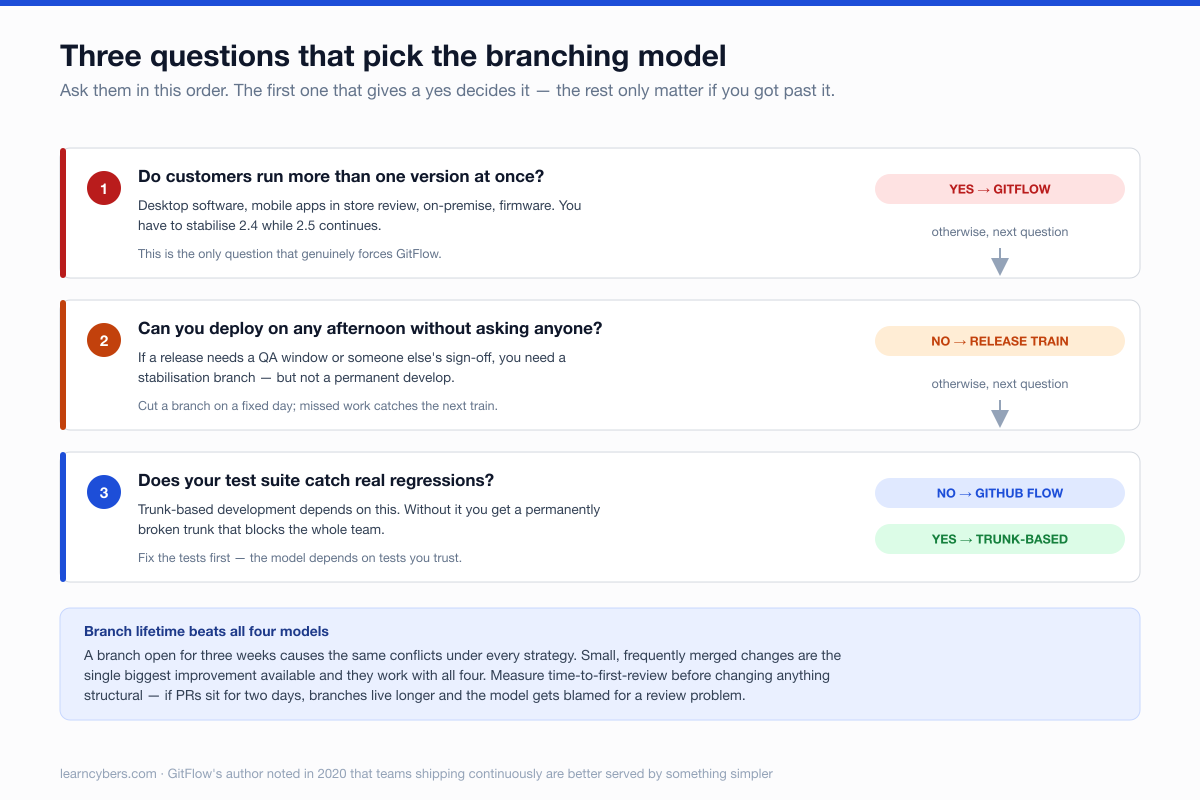
Three questions that settle it faster than the table:
- Do customers run more than one version? Yes → you need release branches. This is the only question that genuinely forces GitFlow.
- Can you deploy on any given afternoon without asking anyone? No → you need a stabilisation window, so GitFlow or a release train.
- Does your test suite catch real regressions? No → do not adopt trunk-based development yet. Fix the tests first; the model depends on them.
What matters more than the model
Teams change branching strategy hoping to fix problems that come from elsewhere. In rough order of impact:
Branch lifetime. A branch open for three weeks causes conflicts under every model. Small, frequently merged changes are the single biggest improvement available, and they are compatible with all four strategies.
Review latency. If PRs sit for two days, branches live longer, conflicts multiply, and the strategy gets blamed. Measure time-to-first-review before changing anything structural.
Protected branches. Whatever the model, require review and passing checks on the branch you deploy from:
gh api repos/:owner/:repo/branches/main/protection -X PUT -f \
  required_pull_request_reviews[required_approving_review_count]=1
Merge strategy consistency. Pick squash, merge commit, or rebase and apply it uniformly. Mixed strategies make history hard to read and git bisect unreliable. Squash-merge suits GitHub Flow and trunk-based work; merge commits suit GitFlow, where the branch structure is itself information.
Changing strategy without disruption
The usual move — GitFlow to something simpler, because releases became continuous:
- Let existing release branches finish; do not migrate mid-release.
- Stop opening new
feature/*branches fromdevelop; branch frommain. - Merge
developintomainonce it is drained, then delete it. - Update CI to deploy from
main, and set branch protection. - Write down the new rules. Most strategy failures are documentation failures — half the team following the old model is worse than either model applied consistently.
Set a review date a month out, and judge it on concrete numbers: time from merge to production, how long branches live, how often a release slips. If those have not improved, the branching model was not the constraint.