Nginx rate limiting that works: leaky buckets, burst, and getting the client IP right
Configure Nginx rate limiting to defend your applications without blocking legitimate users
The directives are the easy part. Behind a CDN, the usual configuration rate-limits the proxy and throttles every visitor as one. Here is the leaky bucket explained, burst and delay tuned properly, and real_ip set up safely.

Nginx rate limiting is a few directives, and the directives are the easy part. What decides whether it works is understanding the leaky bucket underneath, and getting the client identity right — the most common configuration in the wild rate-limits a CDN's IP address and throttles the entire internet as one visitor.
Two mechanisms, for different problems. limit_req caps the rate of requests, which is what stops brute force and API abuse. limit_conn caps simultaneous connections, which is what stops slow-loris style connection exhaustion. Most sites want both.
Get the client identity right first
Every example you will find uses $binary_remote_addr:
limit_req_zone $binary_remote_addr zone=general:10m rate=10r/s;That is correct only when clients connect to Nginx directly. Behind Cloudflare, a load balancer, or any reverse proxy, $remote_addr is the proxy's address. Every visitor shares one bucket, the limit is hit constantly, and you have built an outage rather than a defence.
The fix is real_ip, not $http_x_forwarded_for. Configure the trusted proxy ranges so Nginx rewrites $remote_addr itself:
# Cloudflare ranges - get the current list from cloudflare.com/ips
set_real_ip_from 173.245.48.0/20;
set_real_ip_from 103.21.244.0/22;
# ... remaining ranges ...
set_real_ip_from 2400:cb00::/32;
real_ip_header CF-Connecting-IP;
Behind a generic proxy, use X-Forwarded-For with real_ip_recursive on;. The important part is set_real_ip_from: without it, anyone can send a forged header and select which bucket to spend. Never rate-limit on a header you have not restricted to trusted sources — that turns your protection into a way for an attacker to lock out other users by impersonating their addresses.
Verify before trusting it:
log_format rl '$remote_addr $http_cf_connecting_ip "$request" $status';If $remote_addr shows Cloudflare addresses in the log, real_ip is not working and your rate limiting is not doing what you think.
Request rate limiting
http {
    limit_req_zone $binary_remote_addr zone=general:10m rate=10r/s;

    server {
        location / {
            limit_req zone=general burst=20 nodelay;
            proxy_pass http://backend;
        }
    }
}
Three numbers, each worth understanding.
The zone size. 10m is shared memory for tracking state, not a request count. Each entry is 64 bytes on 64-bit systems, so 1MB holds roughly 16,000 addresses and 10MB roughly 160,000. When it fills, Nginx evicts the oldest entries and logs a warning. Size it to your realistic concurrent-visitor count; 10MB covers most sites comfortably.
The rate. 10r/s is enforced as one request every 100ms, not as ten requests allowed at the top of each second. This surprises people — it is a leaky bucket, and it is why burst exists. You may also write 30r/m, which is one every two seconds.
Burst and nodelay. burst=20 permits a queue of 20 requests above the rate. Without nodelay, those queued requests are delayed to fit the rate — the 20th waits two seconds. With nodelay, they are served immediately while still consuming their queue slots, which refill at the configured rate.
Use nodelay for anything a browser loads. A single page pulling 15 assets is a legitimate burst, and without nodelay you have added seconds of latency to a normal page view.
Two-stage limiting
Since Nginx 1.15.7 you can have both behaviours, which is usually what you actually want:
limit_req zone=general burst=20 delay=8;The first 8 excess requests are served immediately; requests 9 through 20 are throttled to the rate; beyond 20 are rejected. A real browser loading a page never notices, while a scraper feels resistance before it is cut off.
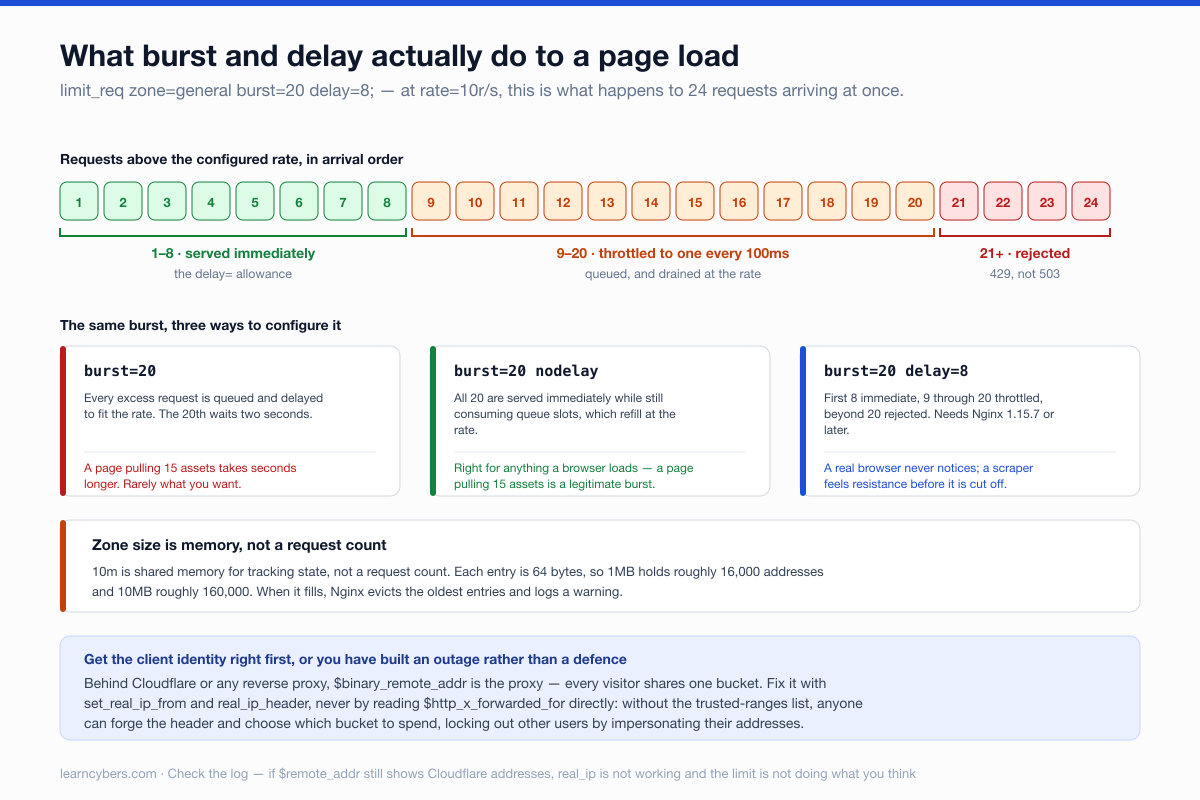
Return 429, not 503
Nginx defaults to 503 Service Unavailable when it rejects a request, which says "the server is broken" rather than "you are going too fast". Clients retry it, and search engines can interpret repeated 503s as a site health problem.
limit_req_status 429;
limit_conn_status 429;
429 Too Many Requests is the correct code, and well-behaved clients back off when they see it. Add a Retry-After header if you can.
Stricter limits on login endpoints
Authentication deserves its own zone and much tighter numbers:
limit_req_zone $binary_remote_addr zone=login:10m rate=5r/m;

location /login {
    limit_req zone=login burst=3 nodelay;
    limit_req_status 429;
    proxy_pass http://backend;
}
Five attempts per minute with a burst of three allows a person who mistyped their password to try again, and makes credential stuffing impractical at any useful speed.
Be clear about the limit of this: it is per-IP, and a credential-stuffing operation distributes across thousands of addresses, spending one or two attempts each. Nginx rate limiting raises the cost; it does not replace account lockout, or detecting a spike in failed logins across all addresses at once.
Connection limiting
limit_conn_zone $binary_remote_addr zone=perip:10m;

server {
    limit_conn perip 20;
}
This addresses a different attack: opening many connections and holding them open without completing requests, exhausting worker slots while generating almost no request rate. Set client_body_timeout and client_header_timeout alongside it, since those are what actually close a stalled connection.
client_body_timeout 10s;
client_header_timeout 10s;
send_timeout 10s;
Be generous with the connection limit. Browsers open six or more per host, and a NAT gateway or office network presents many users as one address. Twenty is reasonable; five will generate support tickets.
Exempting trusted sources
Monitoring, health checks and your own infrastructure should not be throttled. The geo and map pair gives you a conditional key:
geo $limit_exempt {
    default        0;
    10.0.0.0/8     1;
    192.168.0.0/16 1;
    203.0.113.45   1;    # monitoring host
}

map $limit_exempt $limit_key {
    0 $binary_remote_addr;
    1 "";                 # empty key = not counted
}

limit_req_zone $limit_key zone=general:10m rate=10r/s;
An empty key is excluded from the zone entirely. This pattern is worth setting up early — an uptime monitor hitting a rate limit produces alerts that look like a real outage, which is how monitoring stops being trusted.
Seeing what it is doing
log_format ratelimit '$remote_addr [$time_local] "$request" '
                     '$status $limit_req_status';

access_log /var/log/nginx/access.log ratelimit;
$limit_req_status reports PASSED, DELAYED, REJECTED, or DELAYED_TOO_LONG. Rejections also appear in the error log:
grep 'limiting requests' /var/log/nginx/error.log | \
  grep -oP 'client: \K[0-9.]+' | sort | uniq -c | sort -rn | head -20
Read that list before tightening anything. One address at the top is an attacker or a misbehaving integration; a long flat tail of ordinary visitors means your limit is too low and you are throttling customers.
Test it before you rely on it
ab -n 100 -c 10 https://example.com/login

for i in $(seq 1 30); do
  curl -s -o /dev/null -w "%{http_code} " https://example.com/
done; echo
You should see 200s until the burst is spent, then 429s. Test from an address that is not exempt — running this from the server itself commonly hits the exemption and proves nothing.
What this does not protect against
Nginx rate limiting works on requests that reach Nginx. A volumetric attack that saturates your uplink or exhausts connection tracking never gets that far, and no configuration here helps — that needs filtering upstream, at a CDN or your provider's scrubbing service.
It is also per-worker-process in one respect worth knowing: the shared memory zone is shared across workers, so the limit is global rather than multiplied by worker count. But on multiple servers behind a load balancer, each has its own zone, and your effective limit is the configured rate times the number of servers. Account for that, or enforce the limit at the load balancer instead.
A starting configuration
limit_req_zone $limit_key zone=general:10m rate=20r/s;
limit_req_zone $limit_key zone=login:10m   rate=5r/m;
limit_conn_zone $limit_key zone=perip:10m;
limit_req_status 429;
limit_conn_status 429;

server {
    limit_conn perip 20;
    limit_req zone=general burst=40 delay=20;

    location = /login {
        limit_req zone=login burst=3 nodelay;
        proxy_pass http://backend;
    }
}
Deploy it in logging mode first if you can — set generous limits, watch $limit_req_status for a week, then tighten to what the real traffic shows. Guessing the numbers and shipping them is how legitimate users get blocked on launch day.
Directive availability varies by Nginx version (delay= needs 1.15.7 or later). Check nginx -v, and always run nginx -t before reloading.