Write Your First Linux Kernel Module (And Get It to Load)
From hello world to a working kernel module with modern build tools
The C is twenty lines. Getting it to load on a machine bought in the last few years is the hard part, and Secure Boot is the reason — an error that says nothing about signing.

Writing a kernel module is about twenty lines of C. Getting one to load on a machine you bought in the last few years is the part that defeats people, and it has almost nothing to do with the C.
This builds a real module — not a hello-world that prints and exits — and then deals honestly with the four errors that stop a first attempt, including the one that stops most of them and appears in hardly any tutorial.
Before anything: do this in a virtual machine
Not a suggestion. Your module runs in ring 0 with no memory protection between it and everything else. A null dereference in userspace is a segfault; the same mistake here is a kernel panic, and a panic during a write can leave a filesystem inconsistent.
A throwaway VM with snapshots turns "I have to reboot and hope" into "I roll back". Develop on the host, build and load in the guest.
# Debian/Ubuntu
sudo apt install build-essential linux-headers-$(uname -r)

# Fedora/RHEL
sudo dnf install kernel-devel kernel-headers gcc make
The headers must match your running kernel exactly. uname -r tells you what you are running; if the headers package is for anything else, the module you build will refuse to load with an error we will come back to.
What you are actually writing
A kernel module is not a program. It has no main, it does not run, and nothing waits for it to finish. It is a set of functions you register with the kernel, which the kernel then calls when it feels like it — from a process context, from an interrupt, from several CPUs at the same time.
Three consequences follow, and they are what makes kernel code feel different rather than just harder:
- There is no standard library. No
malloc, noprintf, no floating point. You getkmalloc,printkand a large internal API that is documented mostly by its own source. - There is no crash recovery. Userspace gets a segfault and a core dump; you get an oops, and if it happened somewhere critical, a dead machine.
- Everything is concurrent, immediately. The moment you register a file operation, two CPUs can be inside it. There is no single-threaded phase to prototype in.
That last one is why the example below uses an atomic counter for something a userspace program would do with count++. It is not defensive style, it is correct style.
A module that actually does something
Hello-world teaches you the two entry points and nothing else. A misc device is barely more code and gives you something you can read from — which means you can see it working from the shell.
// hitcount.c — exposes /dev/hitcount, which reports how many times it has been read
#include <linux/module.h>
#include <linux/miscdevice.h>
#include <linux/fs.h>
#include <linux/uaccess.h>

static atomic_t hits = ATOMIC_INIT(0);

static ssize_t hitcount_read(struct file *f, char __user *buf,
                             size_t len, loff_t *off)
{
    char line[32];
    int n = scnprintf(line, sizeof(line), "%d\n", atomic_inc_return(&hits));

    // simple_read_from_buffer handles the offset and the copy_to_user for us
    return simple_read_from_buffer(buf, len, off, line, n);
}

static const struct file_operations hitcount_fops = {
    .owner = THIS_MODULE,
    .read  = hitcount_read,
    .llseek = no_llseek,
};

static struct miscdevice hitcount_dev = {
    .minor = MISC_DYNAMIC_MINOR,
    .name  = "hitcount",
    .fops  = &hitcount_fops,
    .mode  = 0444,
};

static int __init hitcount_init(void)
{
    int ret = misc_register(&hitcount_dev);
    if (ret) {
        pr_err("hitcount: misc_register failed: %d\n", ret);
        return ret;              // unwind nothing — nothing succeeded yet
    }
    pr_info("hitcount: loaded, read /dev/hitcount\n");
    return 0;
}

static void __exit hitcount_exit(void)
{
    misc_deregister(&hitcount_dev);
    pr_info("hitcount: unloaded after %d reads\n", atomic_read(&hits));
}

module_init(hitcount_init);
module_exit(hitcount_exit);

MODULE_LICENSE("GPL");
MODULE_AUTHOR("Your Name");
MODULE_DESCRIPTION("A counter you can cat");
MODULE_VERSION("1.0");
Four things in there are worth understanding rather than copying.
MODULE_LICENSE("GPL") is not paperwork. Without it the kernel marks itself tainted and refuses to resolve GPL-only symbols, which is most of the interesting ones. A great many "unknown symbol" failures are this line being absent or misspelled.
__init and __exit place those functions in sections the kernel can discard once they have run, so the init code is not occupying memory for the lifetime of the module.
atomic_t rather than an int. Two processes can read the device simultaneously on different CPUs. A plain count++ is a read-modify-write and it will lose increments. Concurrency is not an advanced topic in kernel code, it is the default condition.
The error path in init. Here there is nothing to unwind because only one thing is registered. In a real module with three allocations, each failure must undo exactly what succeeded before it — which is why kernel code uses goto labels for cleanup, and why that is good style rather than bad.
Building it
# Makefile
obj-m += hitcount.o

all:
	make -C /lib/modules/$(shell uname -r)/build M=$(PWD) modules

clean:
	make -C /lib/modules/$(shell uname -r)/build M=$(PWD) clean
Those must be real tab characters, not spaces — make is unforgiving about it and the error message is not helpful.
make
sudo insmod hitcount.ko
cat /dev/hitcount     # 1
cat /dev/hitcount     # 2
dmesg | tail -2
sudo rmmod hitcount
Why it will not load
This is the section that should be at the front of every kernel module tutorial and never is.
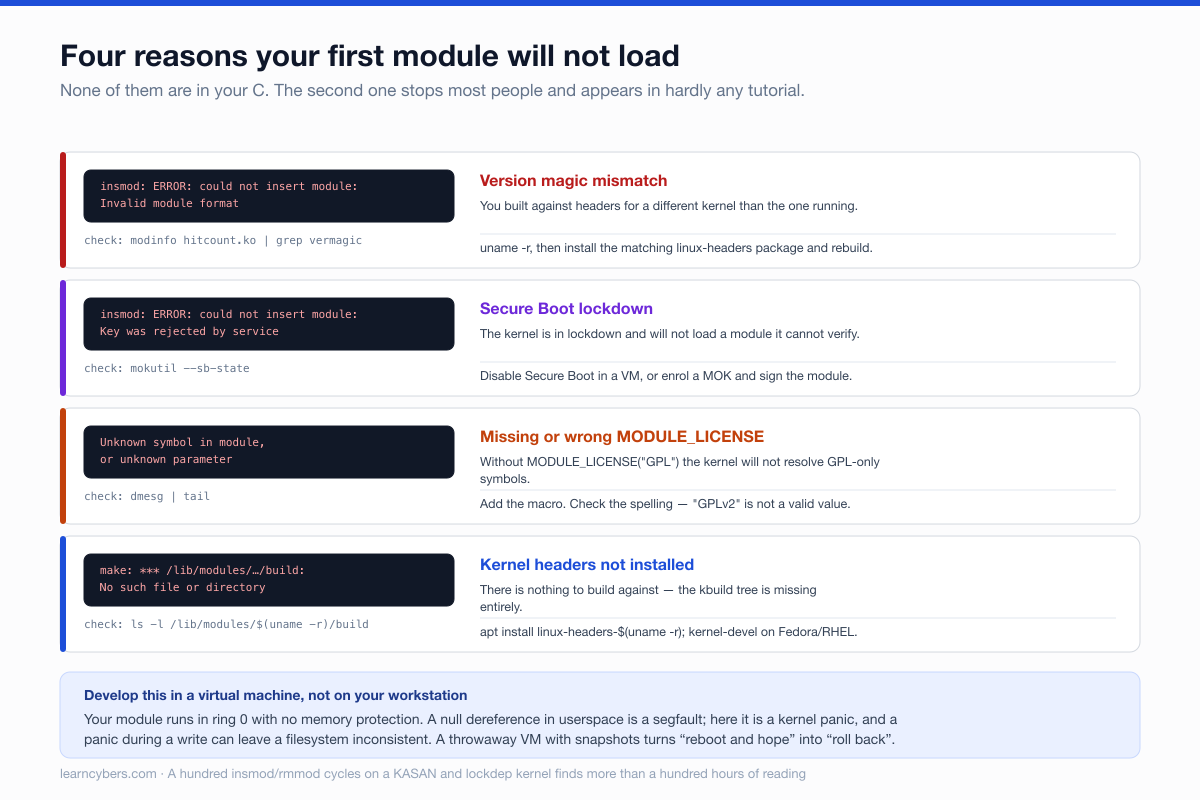
The one that catches almost everybody is the second: Secure Boot. On a stock installation of any current distribution with Secure Boot enabled, the kernel is in lockdown mode and will refuse to load a module it cannot verify. Your perfectly good module is rejected for not being signed, and the error — Key was rejected by service — does not obviously say so.
You have two options. In a VM, turn Secure Boot off and move on. On hardware you want to keep signed, generate a Machine Owner Key, enrol it, and sign the module:
openssl req -new -x509 -newkey rsa:2048 -keyout MOK.priv -outform DER \
  -out MOK.der -nodes -days 36500 -subj "/CN=Local module signing/"

sudo mokutil --import MOK.der          # sets a password; confirm at the next boot

# after rebooting and enrolling:
sudo /usr/src/linux-headers-$(uname -r)/scripts/sign-file \
  sha256 ./MOK.priv ./MOK.der hitcount.ko
The enrolment step happens in a blue MOK manager screen during boot, not in the running system — if you skip it, nothing changes and the module still will not load.
Unloading, which is where the bugs live
Loading a module is easy because nothing is happening yet. Unloading is hard because everything might be.
When rmmod runs, your exit function must leave the kernel in exactly the state it was in before you loaded. Anything you registered must be deregistered, anything you allocated must be freed, and any timer, work item or thread you started must be stopped and waited for — in reverse order of creation, and before you free the memory they might still be touching.
The failure mode is nasty precisely because it is delayed: a timer that fires after its module has been unloaded jumps to an address that no longer contains code, and the resulting oops points at a module that is no longer loaded. A worker that is still running when you free its data gives you a use-after-free somewhere else entirely.
This is why the highest-value exercise for a beginner is not a more complicated module. It is a loop:
for i in $(seq 1 100); do
  sudo insmod hitcount.ko && cat /dev/hitcount >/dev/null && sudo rmmod hitcount
done
dmesg | grep -iE 'oops|bug|warn|leak'
A hundred load/unload cycles on a kernel built with KASAN and lockdep will find problems that a hundred hours of reading will not.
Parameters, so you can configure it without rebuilding
static int start_at = 0;
module_param(start_at, int, 0444);
MODULE_PARM_DESC(start_at, "Initial counter value");sudo insmod hitcount.ko start_at=100
cat /sys/module/hitcount/parameters/start_at # 100The third argument is the permission mask on that sysfs file. 0644 makes it writable at runtime, which is useful and also means userspace can change your module's state whenever it likes — validate accordingly.
What to learn next, in order
- Cleanup paths. Write a module that allocates three things and fails on the third. Getting the unwind right is the single most transferable skill here, and module unload is the least-exercised code in most drivers.
- Locking. Spinlocks versus mutexes, and why you cannot sleep while holding a spinlock. Everything in the kernel is concurrent.
- Debugging.
pr_debugwith dynamic debug rather than scatteredprintk, and ftrace when the question is what ran. We have a separate guide to that. - Rust. Rust support has been in the mainline kernel since 6.1 and the surface is growing. It is not yet where most driver work happens, but it is clearly where some of it is going, and starting there is no longer eccentric.
Versions and scope
The code above targets the 6.x kernel API. Kernel internal interfaces are explicitly not stable — file_operations members, miscdevice and the signing script path have all moved over the years, and code from a tutorial written for 4.x will often not compile. Check the headers on the kernel you are actually building against rather than trusting any published snippet, including this one.
Secure Boot behaviour, MOK enrolment and the location of sign-file vary by distribution. Everything here should be run in a virtual machine you are willing to lose.